# Checking Faxes

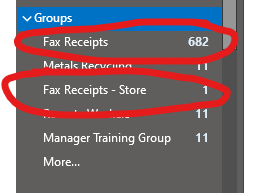
<span style="font-size: 11.0pt; font-family: 'Calibri',sans-serif;">We have changed the way that Action Target sends and receives Faxes. We have consolidated our faxes to go through the HelloFax service. The faxes are then sent to 2 different Outlook groups depending on where they were sent to.</span>

- <span style="font-family: Calibri, sans-serif; font-size: 11pt;">Faxes to the main Action Target fax # of 801-377-8096 are sent to the “Fax Receipts” group.</span>
- <span style="font-size: 11.0pt; font-family: 'Calibri',sans-serif; mso-fareast-font-family: 'Times New Roman';">Faxes to the Store Fax numbers of 651-645-5360 and 763-746-5396 are sent to the “Fax Receipts – Store” group.</span>

<span style="font-size: 11.0pt; font-family: 'Calibri',sans-serif;">The roles who should have access to view Faxes are:</span>

<span style="text-decoration: underline;">**<span style="font-size: 11.0pt; font-family: 'Calibri',sans-serif;">ATI Fax</span>**</span>

- <span style="font-size: 11.0pt; font-family: 'Calibri',sans-serif;">AP Manager</span>
- <span style="font-size: 11.0pt; font-family: 'Calibri',sans-serif;">AP Clerk</span>
- <span style="font-size: 11.0pt; font-family: 'Calibri',sans-serif;">AR Manager</span>
- <span style="font-size: 11.0pt; font-family: 'Calibri',sans-serif;">AR Clerk</span>
- <span style="font-size: 11.0pt; font-family: 'Calibri',sans-serif;">HR Manager</span>
- <span style="font-size: 11.0pt; font-family: 'Calibri',sans-serif;">CFO</span>
- <span style="font-size: 11.0pt; font-family: 'Calibri',sans-serif;">Contracts Manager</span>

<span style="text-decoration: underline;">**<span style="font-size: 11.0pt; font-family: 'Calibri',sans-serif;">Store Fax</span>**</span>

- <span style="font-size: 11.0pt; font-family: 'Calibri',sans-serif;">AP Manager</span>
- <span style="font-size: 11.0pt; font-family: 'Calibri',sans-serif;">AP Clerk</span>
- <span style="font-size: 11.0pt; font-family: 'Calibri',sans-serif;">AR Manager</span>
- <span style="font-size: 11.0pt; font-family: 'Calibri',sans-serif;">AR Clerk</span>
- <span style="font-size: 11.0pt; font-family: 'Calibri',sans-serif;">Store Sales Manager</span>
- <span style="font-size: 11.0pt; font-family: 'Calibri',sans-serif;">Store Warehouse Manager</span>

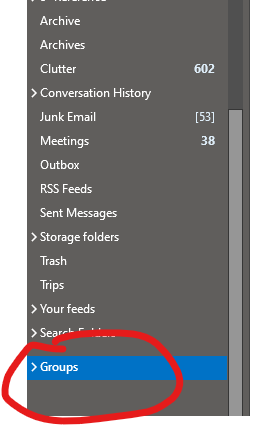
<span style="font-size: 11.0pt; font-family: 'Calibri',sans-serif;">Only people who are added to the group can see those faxes. The groups show up in your Outlook under Groups (see below ).</span>

<span style="font-size: 11.0pt; font-family: 'Calibri',sans-serif;">![](https://wiki.actiontarget.com/uploads/images/gallery/2026-01/embedded-image-exx4t6py.png)</span>

<span style="font-size: 11.0pt; font-family: 'Calibri',sans-serif;"><span style="font-size: 11.0pt; font-family: 'Calibri',sans-serif; mso-fareast-font-family: Aptos; mso-fareast-theme-font: minor-latin; mso-ansi-language: EN-US; mso-fareast-language: EN-US; mso-bidi-language: AR-SA;">![](https://wiki.actiontarget.com/uploads/images/gallery/2026-01/embedded-image-piltxawk.png)</span></span>

<span style="font-size: 11.0pt; font-family: 'Calibri',sans-serif;">If you need to send a fax you will need to be added to HelloFax and have an account. We are limited to the # of accounts right now with HelloFax (unless we want to pay more), so the groups that can send faxes are:</span>

- AP Manager
- AR Manager
- Contracts Manager
- HR Manager

<span style="font-size: 11.0pt; font-family: 'Calibri',sans-serif;">  
</span>

<span style="font-size: 11.0pt; font-family: 'Calibri',sans-serif;"> </span>

<span style="font-size: 11.0pt; font-family: 'Calibri',sans-serif; mso-fareast-font-family: Aptos; mso-fareast-theme-font: minor-latin; mso-ansi-language: EN-US; mso-fareast-language: EN-US; mso-bidi-language: AR-SA;">  
</span>