# Examples

# Phishing Example: Fake Account Deletion Notice

> This example shows a normal-looking email that tries to trick users into thinking their account will be deleted unless they enter login credentials and complete multi-factor verification. If a user submits those credentials, their account can be compromised — notify Action Target IT ***IMMEDIATELY***.

---

#### Picture #1 - The Phishing Email

#### ![image.png](https://wiki.actiontarget.com/uploads/images/gallery/2025-10/scaled-1680-/lt9image.png)

#### Picture #2 - Example of What You Could See by Clicking the Link

![image.png](https://wiki.actiontarget.com/uploads/images/gallery/2025-10/scaled-1680-/7Awimage.png)

---

#### How to Verify Safely

1. Hover over the link and it will show in the bottom left hand corner of the screen. ![image.png](https://wiki.actiontarget.com/uploads/images/gallery/2025-10/scaled-1680-/pwZimage.png)
2. Compare the domain against the official login domain (<span style="color: rgb(230, 126, 35);">@actiontarget.com</span> or <span style="color: rgb(230, 126, 35);">company SSO URL</span>)
3. If you are unsure, open a browser and navigate manually to the company portal (do NOT click the suspicious link)
4. Contact the IT team via an independent channel (phone, email, teams, ticket, in-person)

---

#### If You Clicked or Entered Credentials (URGENT)

1. *<span style="text-decoration: underline;">**IMMEDIATELY**</span>* notify the Action Target IT team and forward them the email at <servicedesk@actiontarget.com>.
2. Provide any details about the incident to the IT team (approx. time, what you entered, screenshots ***if available***)
3. Follow the instructions the IT team provides you - this may require additional containment (password resets, account hold, forensic review).

---

#### What's the Goal?

This email is trying to trick you into giving up your Action Target login and multi-factor authentication by creating a false emergency — for example, claiming your account will be deleted unless you “verify” right away. If you enter your credentials or MFA code, attackers can take over your account and use it to read sensitive messages, send more phishing emails from a trusted address, request fraudulent payments, or create automatic forwarding rules to keep access.

Attackers rely on pressure and perceived authority (pretending to be IT or a trusted service) so you’ll act without checking. Always pause, verify the request through a different channel (phone or the official IT helpdesk), and report the email to IT if anything seems off.

---

<p class="callout info">***Takeaway:*** Attackers rely on urgency and familiar-looking interfaces. Pause and verify every request for credentials or multi-factor authentication via an independent channel. If you suspect compromise, report to the IT team <span style="text-decoration: underline;">***immediately***</span> -- fast containment reduces the damage.</p>

# Phishing Example: Executive Impersonation - Request for Personal Information

> This phishing email impersonates the company’s CEO, asking staff to provide personal information for a supposed “staff reward.” The vague wording, lack of personalization, and request for personal data via email are classic signs of a Business Email Compromise (BEC) attempt.

---

#### Picture #1 - The Phishing Email
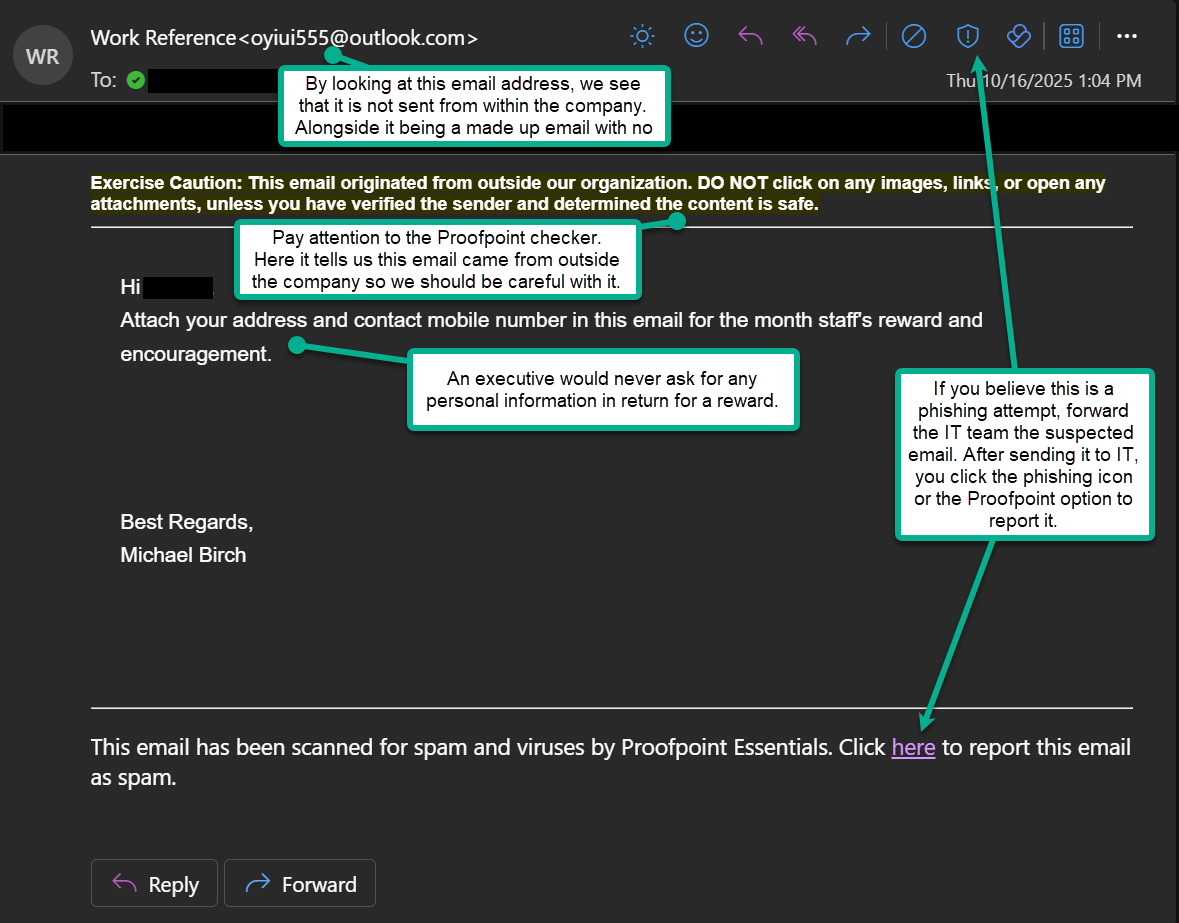
![image.png](https://wiki.actiontarget.com/uploads/images/gallery/2025-10/scaled-1680-/8QQimage.png)

---

#### What to Do Instead

1. If you are not sure whether it is fake or real, verify the request through another channel (e.g., call or message HR to see if they are doing staff reward).
2. Never send personal or company data in response to an unexpected email.
3. Report the email to the IT team and forward it to them. Then you can report it phishing with the Outlook button.

---

#### How to Verify an Executive's Email

1. Hover over the sender's name to see the real email address.
2. Compare it to the executive's actual email domain (<span style="color: rgb(230, 126, 35);">@actiontarget.com</span>)
3. Look for differences such as extra letter, wrong domain endings, etc.

---

#### What's the Goal?

Attackers send CEO, or other executive, impersonation emails to trick employees into sharing personal or company information, sending gift cards, or transferring money. They exploit authority and trust -- if a request appears to come from a high-ranking executive, recipients are less likely to question it.

---

<p class="callout info">***Remember:*** Even if an email looks like it's from leadership, pause before responding. Verify through official channels and report any suspicious messages *<span style="text-decoration: underline;">**immediately**</span>*.</p>