# Phishing Attack Examples

# What to Look Out for in Phishing Emails

> Phishing emails try to trick recipients into revealing credentials, installing malware, or transferring money. Attackers use urgency, impersonation, and fake links. Train yourself to pause, inspect, and verify before clicking or replying.

---

### Red Flags to Look for in Phishing Emails

<details id="bkmrk-sender-%26-identity-di"><summary>Sender &amp; Identity</summary>

<span style="text-decoration: underline;">**Display Name VS. Real Address:**</span> An email might be from <span style="color: rgb(230, 126, 35);">IT-ServiceDesk &lt;servicedesk@actiontarget.com&gt;</span> -- ensure to hover or view the full address to ensure it is a legitimate email.

<span style="text-decoration: underline;">**Spoofed Domains:**</span> If you are skeptical of an email, ensure to check the email address and make sure it is the correct email address.

<p class="callout info">Ex) <span style="color: rgb(230, 126, 35);">account-security@amaz0n.com</span> VS. <span style="color: rgb(230, 126, 35);">account-security@amazon.com </span> The first email address has a '<span style="color: rgb(230, 126, 35);">0</span>' instead of an '<span style="color: rgb(230, 126, 35);">o</span>'. This is a solid way of determining if you are experiencing a phishing attack. If you are still uncertain, reach out to the IT department for help.</p>

<span style="text-decoration: underline;">**Reply-to is Different:**</span> The sender could be <span style="color: rgb(230, 126, 35);">bob@actiontarget.com</span> but the reply-to is <span style="color: rgb(230, 126, 35);">timmy@gmail.com</span>.


</details><details id="bkmrk-links-%26-urls-%C2%A0"><summary>Links &amp; URLs</summary>

<span style="text-decoration: underline;">**Hover before clicking:**</span> Hover over a link to preview the destination. If the visible text says <span style="color: rgb(230, 126, 35);">company.com/login</span> but hovering shows <span style="color: rgb(230, 126, 35);">http://bad-site.com/XYZ</span>, it is phishing.

<p class="callout info">When hovering over the link, you will see the destination in the bottom left-hand corner of the screen.</p>

<span style="text-decoration: underline;">**Shortened or obfuscated links:**</span> Bit.ly links or long, token-filled URLs -- Treat these with caution!

<p class="callout info">A token filled URL will have a long, random string of characters that are often after a <span style="color: rgb(241, 196, 15);">?</span> or <span style="color: rgb(241, 196, 15);">\#</span>. Ex of a ? token) <span style="color: rgb(230, 126, 35);">https://microsoft.com.verify-login.info/<span style="color: rgb(241, 196, 15);">?</span>id=U29tZVRva2VuVmFsdWU9MTIzNDU=</span> Ex of a # token) <span style="color: rgb(230, 126, 35);">https://paypal.com.security-check.io/<span style="color: rgb(241, 196, 15);">\#</span>token=eyJhbGciOiJIUzI1NiIsInR5cCI6IkpXVCJ9</span></p>

<span style="text-decoration: underline;">**Mismatch Example:**</span> Link text will say "*<span style="color: rgb(230, 126, 35);">Secure your account</span>" ---&gt;* Hovering shows <span style="color: rgb(230, 126, 35);">http://212.16.152.5/verify</span>

</details><details id="bkmrk-content-%26-social-eng"><summary>Content &amp; Social Engineering</summary>

**<span style="text-decoration: underline;">Urgency &amp; Threats:</span>** "Your account will be deleted in 24 hours unless you verify"

**<span style="text-decoration: underline;">Too good to be true:</span>** "You won $5,000 - Click to claim"

**<span style="text-decoration: underline;">Unrequested Attachments:</span>** Attachments asking you to enable macros; opening can run malware on your device.

**<span style="text-decoration: underline;">Spear-phish signs:</span>** Uses your co-worker's, manager's, or an executive's name or specific project details to get information

</details><details id="bkmrk-attachments-%26-file-t"><summary>Attachments &amp; File Types</summary>

<span style="text-decoration: underline;">**High-risk file types:**</span> <span style="color: rgb(230, 126, 35);">.exe</span>, <span style="color: rgb(230, 126, 35);">.scr</span>, <span style="color: rgb(230, 126, 35);">.bat</span>, <span style="color: rgb(230, 126, 35);">.com</span>, <span style="color: rgb(230, 126, 35);">.js</span>, <span style="color: rgb(230, 126, 35);">.vbs</span>, <span style="color: rgb(230, 126, 35);">.jar</span>

<span style="text-decoration: underline;">**Malicious Office files:**</span> <span style="color: rgb(230, 126, 35);">.docx</span> or <span style="color: rgb(230, 126, 35);">.xlsx</span> that prompt users to "Enable Editing" or macros

<span style="text-decoration: underline;">**Compressed files:**</span> <span style="color: rgb(230, 126, 35);">.zip</span> or <span style="color: rgb(230, 126, 35);">.7z</span> with executables (.exe) inside

</details><details id="bkmrk-visual-%26-language-cu"><summary>Visual &amp; Language Cues</summary>

<span style="text-decoration: underline;">**Poor grammar/spelling:**</span> Keep an eye out for improper spelling and incorrect grammar. These can be signs of a phishing email.

<span style="text-decoration: underline;">**Off-brand fonts, odd spacing, or low-quality logos:**</span> This is another sign of a phishing email.

<span style="text-decoration: underline;">**Incorrect salutations or signature block:**</span> There could be no phone number or a different formatting than usual.

</details>---

#### Realistic Examples

- [Phishing Example: Fake Account Deletion Notice](https://wiki.actiontarget.com/books/phishing-attack-examples/page/phishing-example-fake-account-deletion-notice "Example 1")
- [Phishing Example: Executive Impersonation - Request for Personal Information ](https://wiki.actiontarget.com/books/phishing-attack-examples/page/phishing-example-executive-impersonation-request-for-personal-information)

---

#### What to do if you suspect phishing

***If you suspect phishing, you should:***

1. <span style="text-decoration: underline;">**Do NOT click anything. Do NOT open any attachments.**</span>
2. <span style="text-decoration: underline;">**Verify the sender's email address.**</span> Check the email address to see if anything has been spoofed or if something seems off.
3. <span style="text-decoration: underline;">**Report internally**</span> ---&gt; create a ticket and forward the suspected phishing email to the IT team at <servicedesk@actiontarget.com>.
4. <span style="text-decoration: underline;">**If you clicked or opened:**</span> notify the IT team ***IMMEDIATELY***. Time is of the essence. Disconnect from the network (if malware is suspected).
5. <span style="text-decoration: underline;">**Preserve the email.**</span> Do not delete it until the IT team has a copy of it, so that they may investigate it.

# Examples

# Phishing Example: Fake Account Deletion Notice

> This example shows a normal-looking email that tries to trick users into thinking their account will be deleted unless they enter login credentials and complete multi-factor verification. If a user submits those credentials, their account can be compromised — notify Action Target IT ***IMMEDIATELY***.

---

#### Picture #1 - The Phishing Email

#### ![image.png](https://wiki.actiontarget.com/uploads/images/gallery/2025-10/scaled-1680-/lt9image.png)

#### Picture #2 - Example of What You Could See by Clicking the Link

![image.png](https://wiki.actiontarget.com/uploads/images/gallery/2025-10/scaled-1680-/7Awimage.png)

---

#### How to Verify Safely

1. Hover over the link and it will show in the bottom left hand corner of the screen. ![image.png](https://wiki.actiontarget.com/uploads/images/gallery/2025-10/scaled-1680-/pwZimage.png)
2. Compare the domain against the official login domain (<span style="color: rgb(230, 126, 35);">@actiontarget.com</span> or <span style="color: rgb(230, 126, 35);">company SSO URL</span>)
3. If you are unsure, open a browser and navigate manually to the company portal (do NOT click the suspicious link)
4. Contact the IT team via an independent channel (phone, email, teams, ticket, in-person)

---

#### If You Clicked or Entered Credentials (URGENT)

1. *<span style="text-decoration: underline;">**IMMEDIATELY**</span>* notify the Action Target IT team and forward them the email at <servicedesk@actiontarget.com>.
2. Provide any details about the incident to the IT team (approx. time, what you entered, screenshots ***if available***)
3. Follow the instructions the IT team provides you - this may require additional containment (password resets, account hold, forensic review).

---

#### What's the Goal?

This email is trying to trick you into giving up your Action Target login and multi-factor authentication by creating a false emergency — for example, claiming your account will be deleted unless you “verify” right away. If you enter your credentials or MFA code, attackers can take over your account and use it to read sensitive messages, send more phishing emails from a trusted address, request fraudulent payments, or create automatic forwarding rules to keep access.

Attackers rely on pressure and perceived authority (pretending to be IT or a trusted service) so you’ll act without checking. Always pause, verify the request through a different channel (phone or the official IT helpdesk), and report the email to IT if anything seems off.

---

<p class="callout info">***Takeaway:*** Attackers rely on urgency and familiar-looking interfaces. Pause and verify every request for credentials or multi-factor authentication via an independent channel. If you suspect compromise, report to the IT team <span style="text-decoration: underline;">***immediately***</span> -- fast containment reduces the damage.</p>

# Phishing Example: Executive Impersonation - Request for Personal Information

> This phishing email impersonates the company’s CEO, asking staff to provide personal information for a supposed “staff reward.” The vague wording, lack of personalization, and request for personal data via email are classic signs of a Business Email Compromise (BEC) attempt.

---

#### Picture #1 - The Phishing Email
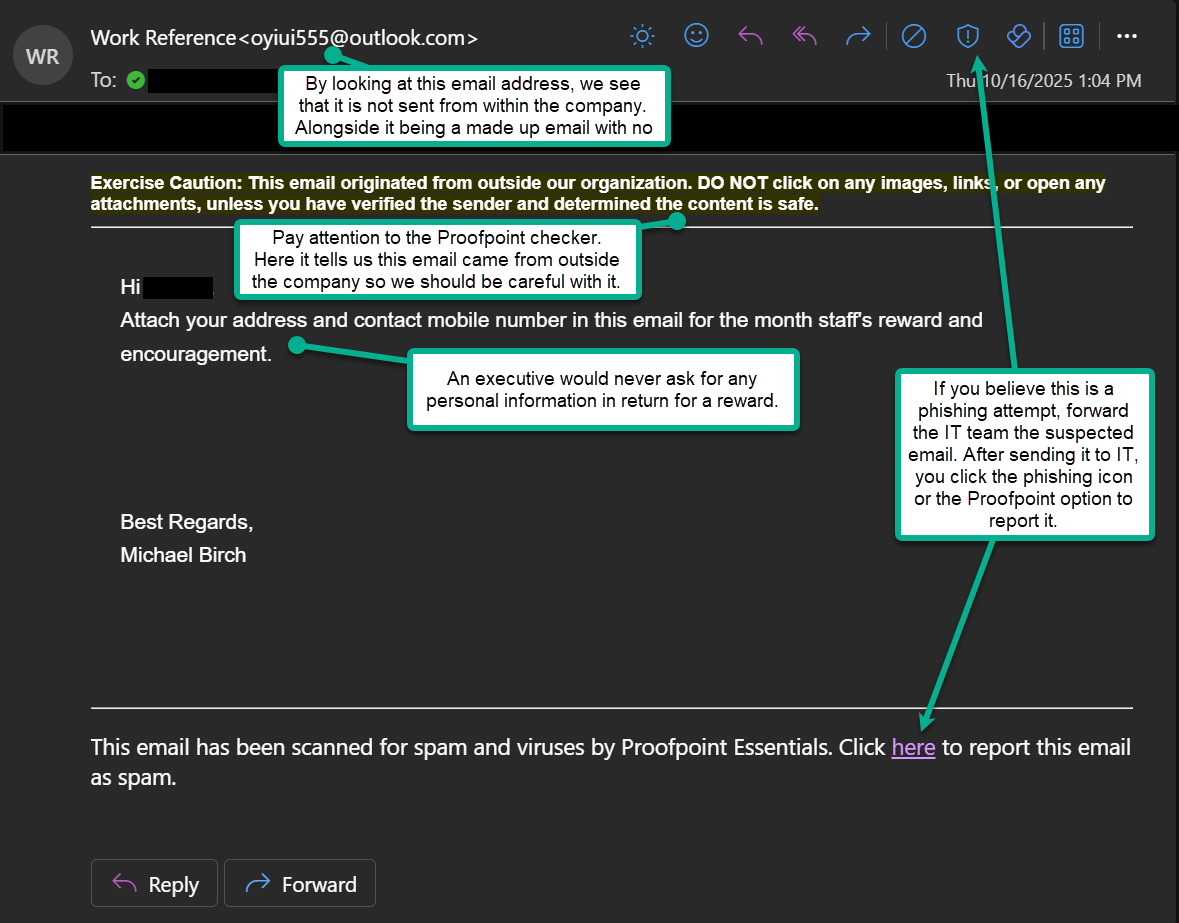
![image.png](https://wiki.actiontarget.com/uploads/images/gallery/2025-10/scaled-1680-/8QQimage.png)

---

#### What to Do Instead

1. If you are not sure whether it is fake or real, verify the request through another channel (e.g., call or message HR to see if they are doing staff reward).
2. Never send personal or company data in response to an unexpected email.
3. Report the email to the IT team and forward it to them. Then you can report it phishing with the Outlook button.

---

#### How to Verify an Executive's Email

1. Hover over the sender's name to see the real email address.
2. Compare it to the executive's actual email domain (<span style="color: rgb(230, 126, 35);">@actiontarget.com</span>)
3. Look for differences such as extra letter, wrong domain endings, etc.

---

#### What's the Goal?

Attackers send CEO, or other executive, impersonation emails to trick employees into sharing personal or company information, sending gift cards, or transferring money. They exploit authority and trust -- if a request appears to come from a high-ranking executive, recipients are less likely to question it.

---

<p class="callout info">***Remember:*** Even if an email looks like it's from leadership, pause before responding. Verify through official channels and report any suspicious messages *<span style="text-decoration: underline;">**immediately**</span>*.</p>