# Shipping Systems

Processes involving the systems used in shipping.

# Starship

These are the pages to follow to setup a user in Starship

1. Create connector
2. Setup Printers
3. Setup Print profile

# Starship Cloud - User Connector Config

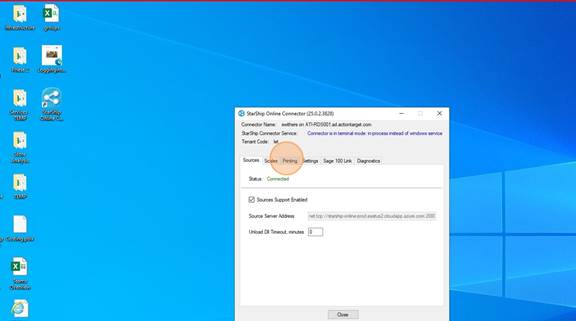
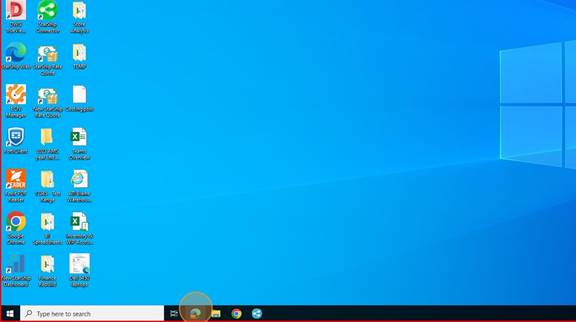
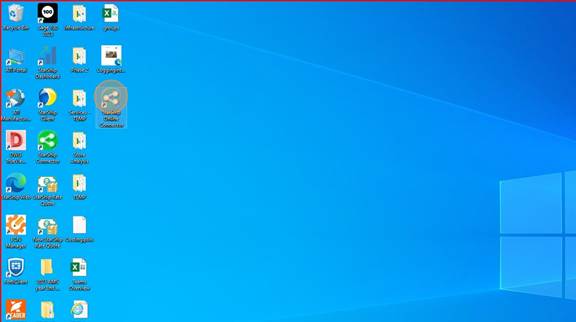
<span style="mso-fareast-font-family: Cambria; mso-fareast-theme-font: minor-latin; mso-bidi-font-family: Cambria; mso-bidi-theme-font: minor-latin;"><span style="mso-list: Ignore;">1.<span style="font: 7.0pt 'Times New Roman';"> </span></span></span>Double-click on "Starship Online Connector"
<span style="mso-no-proof: yes;">![](https://wiki.actiontarget.com/uploads/images/gallery/2025-09/embedded-image-khshlaes.jpeg)</span>

<span style="mso-fareast-font-family: Cambria; mso-fareast-theme-font: minor-latin; mso-bidi-font-family: Cambria; mso-bidi-theme-font: minor-latin;"><span style="mso-list: Ignore;">2.<span style="font: 7.0pt 'Times New Roman';"> </span></span></span>Click on the "Printing" tab

<span style="mso-no-proof: yes;">![](https://wiki.actiontarget.com/uploads/images/gallery/2025-09/embedded-image-x69gr5gv.jpeg)</span>

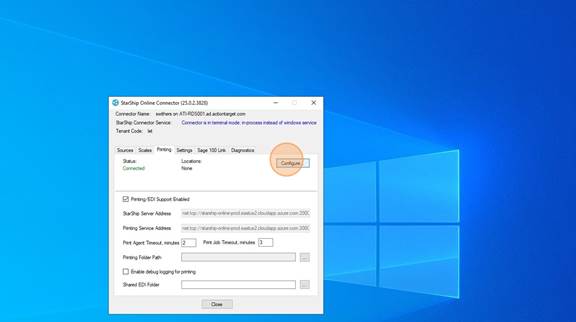
<span style="mso-fareast-font-family: Cambria; mso-fareast-theme-font: minor-latin; mso-bidi-font-family: Cambria; mso-bidi-theme-font: minor-latin;"><span style="mso-list: Ignore;">3.<span style="font: 7.0pt 'Times New Roman';"> </span></span></span>Click on "Configure"

<span style="mso-no-proof: yes;">![](https://wiki.actiontarget.com/uploads/images/gallery/2025-09/embedded-image-nnnxx8qu.jpeg)</span>

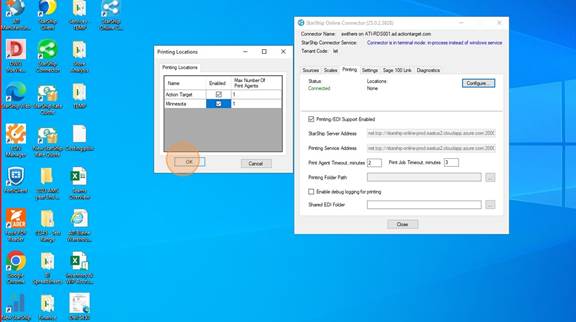
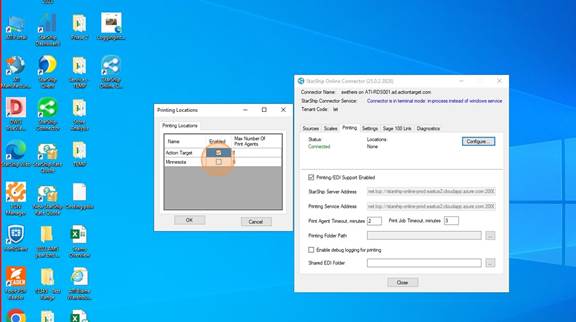
<span style="mso-fareast-font-family: Cambria; mso-fareast-theme-font: minor-latin; mso-bidi-font-family: Cambria; mso-bidi-theme-font: minor-latin;"><span style="mso-list: Ignore;">4.<span style="font: 7.0pt 'Times New Roman';"> </span></span></span>Choose the location (s) where the User will be shipping from. You can choose multiple locations.
<span style="mso-no-proof: yes;">![](https://wiki.actiontarget.com/uploads/images/gallery/2025-09/embedded-image-xqnqnhma.jpeg)</span>

<span style="mso-fareast-font-family: Cambria; mso-fareast-theme-font: minor-latin; mso-bidi-font-family: Cambria; mso-bidi-theme-font: minor-latin;"><span style="mso-list: Ignore;">5.<span style="font: 7.0pt 'Times New Roman';"> </span></span></span>Click "OK"

<span style="mso-no-proof: yes;">![](https://wiki.actiontarget.com/uploads/images/gallery/2025-09/embedded-image-nvgdmkzn.jpeg)</span>

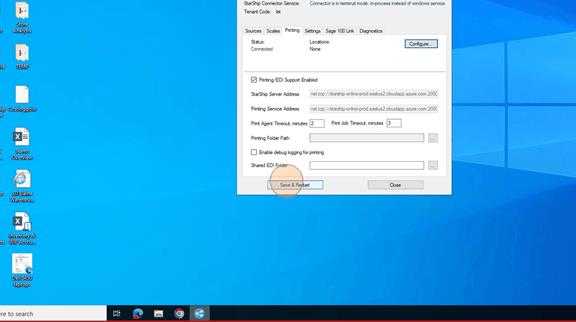
<span style="mso-fareast-font-family: Cambria; mso-fareast-theme-font: minor-latin; mso-bidi-font-family: Cambria; mso-bidi-theme-font: minor-latin;"><span style="mso-list: Ignore;">6.<span style="font: 7.0pt 'Times New Roman';"> </span></span></span>Click on "Save and Restart". Then wait until the Staus shows Connected and the location(s) are in there with Active next to them.
<span style="mso-no-proof: yes;">![](https://wiki.actiontarget.com/uploads/images/gallery/2025-09/embedded-image-sgls4x7b.png)</span>

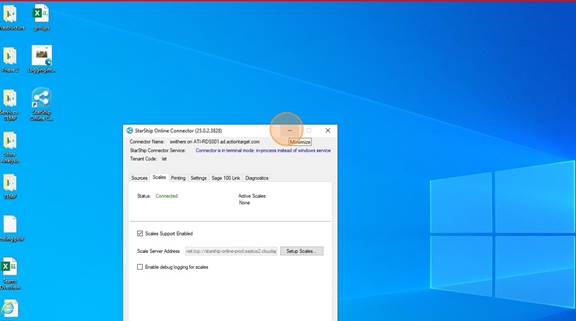
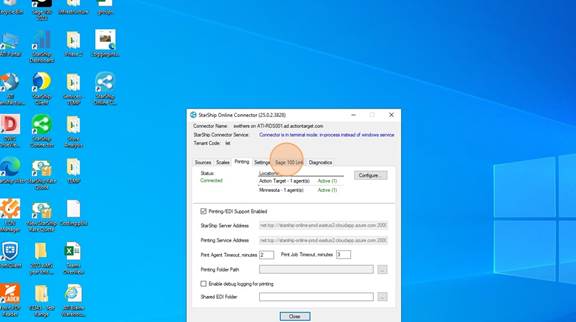
<span style="mso-fareast-font-family: Cambria; mso-fareast-theme-font: minor-latin; mso-bidi-font-family: Cambria; mso-bidi-theme-font: minor-latin;"><span style="mso-list: Ignore;">7.<span style="font: 7.0pt 'Times New Roman';"> </span></span></span>Once it looks like below with the location(s)<span style="mso-spacerun: yes;"> </span>and the Active showing, you are done here. DO NOT CLOSE the Connector. This MUST STAY OPEN while you are using Starship Cloud. It can be minimized.
<span style="mso-no-proof: yes;">![](https://wiki.actiontarget.com/uploads/images/gallery/2025-09/embedded-image-b8uqunkr.jpeg)</span>

<span style="mso-fareast-font-family: Cambria; mso-fareast-theme-font: minor-latin; mso-bidi-font-family: Cambria; mso-bidi-theme-font: minor-latin;"><span style="mso-list: Ignore;">8.<span style="font: 7.0pt 'Times New Roman';"> </span></span></span>MINIMIZE the window

<span style="mso-no-proof: yes;">![](https://wiki.actiontarget.com/uploads/images/gallery/2025-09/embedded-image-9rtnsucj.jpeg)</span>

<span style="mso-fareast-font-family: Cambria; mso-fareast-theme-font: minor-latin; mso-bidi-font-family: Cambria; mso-bidi-theme-font: minor-latin;"><span style="mso-list: Ignore;">9.<span style="font: 7.0pt 'Times New Roman';"> </span></span></span>Open a browser

<span style="mso-no-proof: yes;">![](https://wiki.actiontarget.com/uploads/images/gallery/2025-09/embedded-image-sdhtk14p.jpeg)</span>

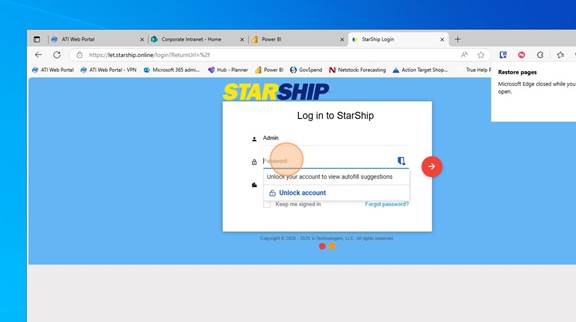
<span style="mso-fareast-font-family: Cambria; mso-fareast-theme-font: minor-latin; mso-bidi-font-family: Cambria; mso-bidi-theme-font: minor-latin;"><span style="mso-list: Ignore;">10.<span style="font: 7.0pt 'Times New Roman';"> </span></span></span>Type in "let.starship.online" and go to the page  
Log in with your Starship Cloud Username and Password. This should have been emailed to you.
<span style="mso-no-proof: yes;">![](https://wiki.actiontarget.com/uploads/images/gallery/2025-09/embedded-image-mhgdh57n.jpeg)</span>

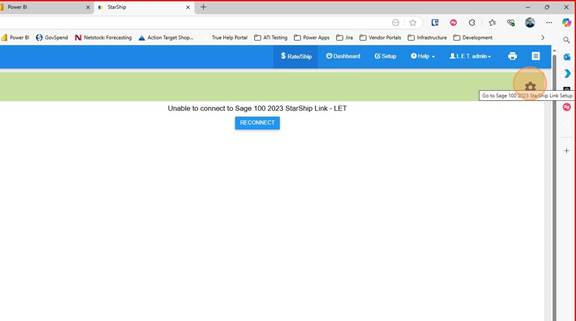
<span style="mso-fareast-font-family: Cambria; mso-fareast-theme-font: minor-latin; mso-bidi-font-family: Cambria; mso-bidi-theme-font: minor-latin;"><span style="mso-list: Ignore;">11.<span style="font: 7.0pt 'Times New Roman';"> </span></span></span>Click on the Gear icon

<span style="mso-no-proof: yes;">![](https://wiki.actiontarget.com/uploads/images/gallery/2025-09/embedded-image-ypm7vwdi.jpeg)</span>

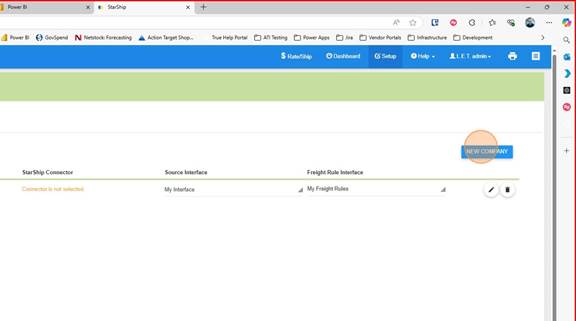
<span style="mso-fareast-font-family: Cambria; mso-fareast-theme-font: minor-latin; mso-bidi-font-family: Cambria; mso-bidi-theme-font: minor-latin;"><span style="mso-list: Ignore;">12.<span style="font: 7.0pt 'Times New Roman';"> </span></span></span>Click "New Company"

<span style="mso-no-proof: yes;">![](https://wiki.actiontarget.com/uploads/images/gallery/2025-09/embedded-image-bujtk5sm.jpeg)</span>

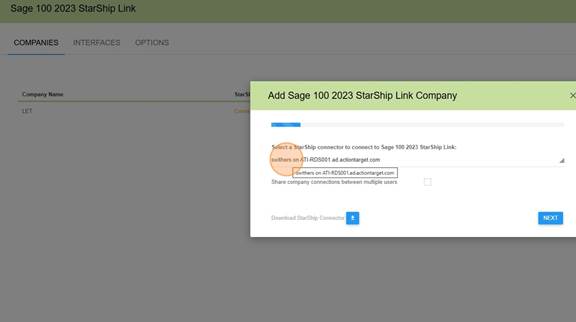
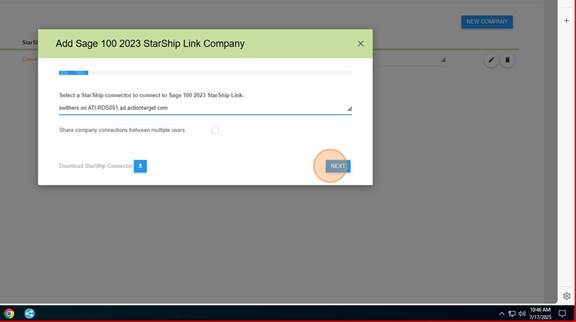
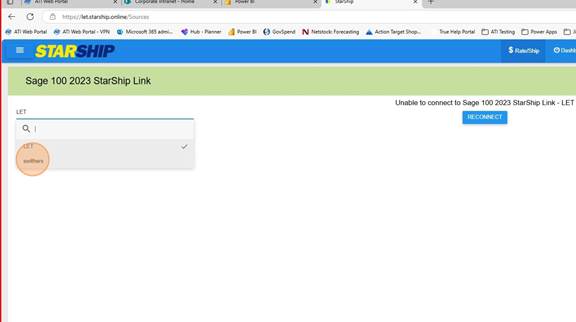
<span style="mso-fareast-font-family: Cambria; mso-fareast-theme-font: minor-latin; mso-bidi-font-family: Cambria; mso-bidi-theme-font: minor-latin;"><span style="mso-list: Ignore;">13.<span style="font: 7.0pt 'Times New Roman';"> </span></span></span>Choose the connector you just created.

<span style="mso-no-proof: yes;">![](https://wiki.actiontarget.com/uploads/images/gallery/2025-09/embedded-image-diiu7ray.jpeg)</span>

<span style="mso-fareast-font-family: Cambria; mso-fareast-theme-font: minor-latin; mso-bidi-font-family: Cambria; mso-bidi-theme-font: minor-latin;"><span style="mso-list: Ignore;">14.<span style="font: 7.0pt 'Times New Roman';"> </span></span></span>Click "Next"

<span style="mso-no-proof: yes;">![](https://wiki.actiontarget.com/uploads/images/gallery/2025-09/embedded-image-ud1ayj6z.jpeg)</span>

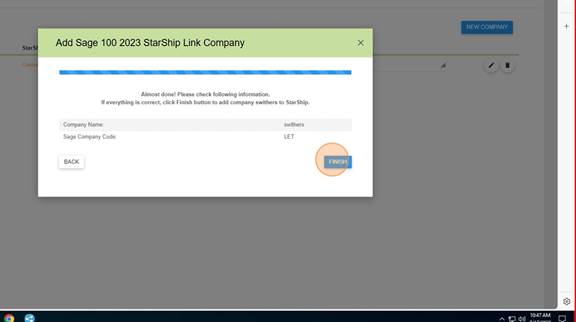
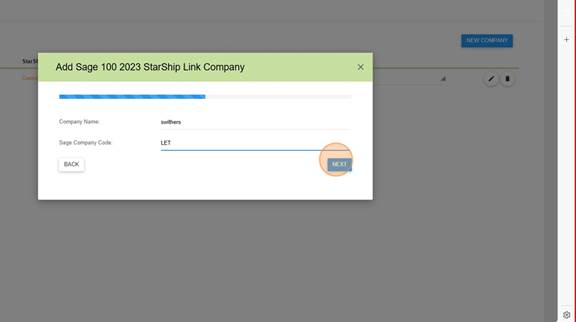
<span style="mso-fareast-font-family: Cambria; mso-fareast-theme-font: minor-latin; mso-bidi-font-family: Cambria; mso-bidi-theme-font: minor-latin;"><span style="mso-list: Ignore;">15.<span style="font: 7.0pt 'Times New Roman';"> </span></span></span>For Company Name - Your Username (the example below is swithers)  
For Sage Company Code - LET  
Click on "Next"
<span style="mso-no-proof: yes;">![](https://wiki.actiontarget.com/uploads/images/gallery/2025-09/embedded-image-r4ayvzwr.jpeg)</span>

<span style="mso-fareast-font-family: Cambria; mso-fareast-theme-font: minor-latin; mso-bidi-font-family: Cambria; mso-bidi-theme-font: minor-latin;"><span style="mso-list: Ignore;">16.<span style="font: 7.0pt 'Times New Roman';"> </span></span></span>Click "Finish"

<span style="mso-no-proof: yes;">![](https://wiki.actiontarget.com/uploads/images/gallery/2025-09/embedded-image-vpv8aqie.jpeg)</span>

# Starship - User Setup Printers

<span style="mso-fareast-font-family: Cambria; mso-fareast-theme-font: minor-latin; mso-bidi-font-family: Cambria; mso-bidi-theme-font: minor-latin;"><span style="mso-list: Ignore;">Follow these steps to setup the Printers for the user. Typically 2 printers are needed: </span></span>

- <span style="mso-fareast-font-family: Cambria; mso-fareast-theme-font: minor-latin; mso-bidi-font-family: Cambria; mso-bidi-theme-font: minor-latin;"><span style="mso-list: Ignore;">Laser Printer</span></span>
- <span style="mso-fareast-font-family: Cambria; mso-fareast-theme-font: minor-latin; mso-bidi-font-family: Cambria; mso-bidi-theme-font: minor-latin;"><span style="mso-list: Ignore;">Lable Printer</span></span>

##### <span style="mso-fareast-font-family: Cambria; mso-fareast-theme-font: minor-latin; mso-bidi-font-family: Cambria; mso-bidi-theme-font: minor-latin;"><span style="mso-list: Ignore;">**The Starship Online Connector on your desktop must be setup and running on your desktop before you can do any of these steps.** </span></span>

[![image.png](https://wiki.actiontarget.com/uploads/images/gallery/2025-09/scaled-1680-/GQXimage.png)](https://wiki.actiontarget.com/uploads/images/gallery/2025-09/GQXimage.png)

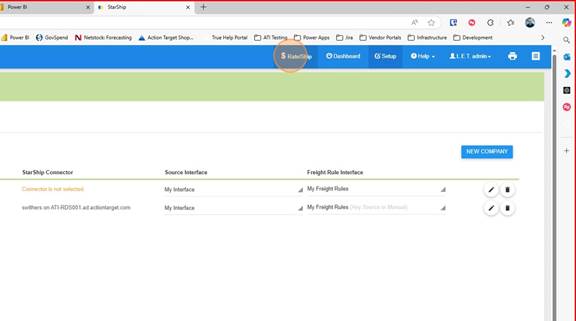
1\. Click on "Rate/Ship"
<span style="mso-no-proof: yes;">![](https://wiki.actiontarget.com/uploads/images/gallery/2025-09/embedded-image-cakxs8kl.jpeg)</span>

<span style="mso-fareast-font-family: Cambria; mso-fareast-theme-font: minor-latin; mso-bidi-font-family: Cambria; mso-bidi-theme-font: minor-latin;"><span style="mso-list: Ignore;">2.<span style="font: 7.0pt 'Times New Roman';"> </span></span></span>Choose the user connector

<span style="mso-no-proof: yes;">![](https://wiki.actiontarget.com/uploads/images/gallery/2025-09/embedded-image-uzot9idx.jpeg)</span>

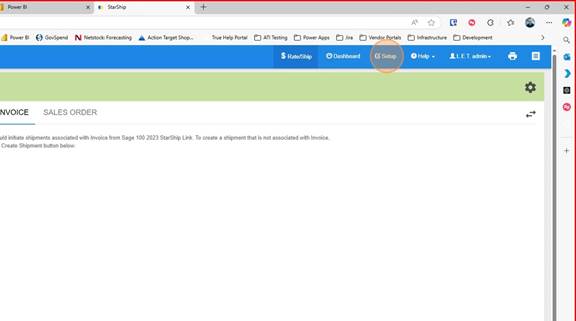
<span style="mso-fareast-font-family: Cambria; mso-fareast-theme-font: minor-latin; mso-bidi-font-family: Cambria; mso-bidi-theme-font: minor-latin;"><span style="mso-list: Ignore;">3.<span style="font: 7.0pt 'Times New Roman';"> </span></span></span>Click on Setup

<span style="mso-no-proof: yes;">![](https://wiki.actiontarget.com/uploads/images/gallery/2025-09/embedded-image-z14yqxjh.jpeg)</span>

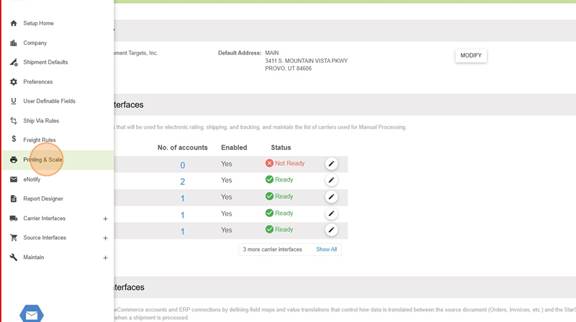
<span style="mso-fareast-font-family: Cambria; mso-fareast-theme-font: minor-latin; mso-bidi-font-family: Cambria; mso-bidi-theme-font: minor-latin;"><span style="mso-list: Ignore;">4.<span style="font: 7.0pt 'Times New Roman';"> </span></span></span>Click on "Printing and Scale"

<span style="mso-no-proof: yes;">![](https://wiki.actiontarget.com/uploads/images/gallery/2025-09/embedded-image-byzfdlot.jpeg)</span>

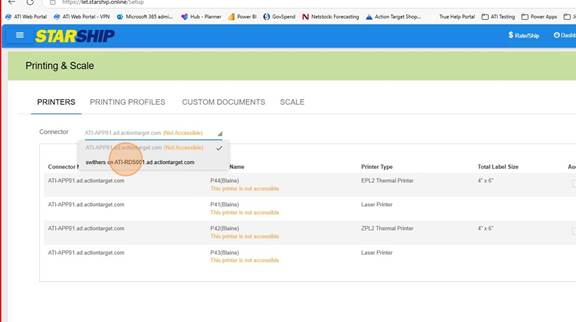
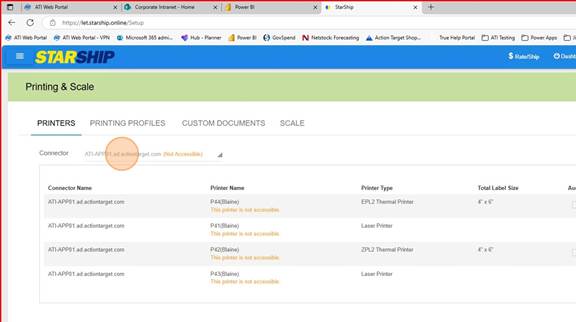
<span style="mso-fareast-font-family: Cambria; mso-fareast-theme-font: minor-latin; mso-bidi-font-family: Cambria; mso-bidi-theme-font: minor-latin;"><span style="mso-list: Ignore;">5.<span style="font: 7.0pt 'Times New Roman';"> </span></span></span>Under Printers choose the Connector you want to add printers to
<span style="mso-no-proof: yes;">![](https://wiki.actiontarget.com/uploads/images/gallery/2025-09/embedded-image-pgzzqtn1.jpeg)</span><span style="mso-no-proof: yes;">![](https://wiki.actiontarget.com/uploads/images/gallery/2025-09/embedded-image-bbbld6z6.jpeg)</span>

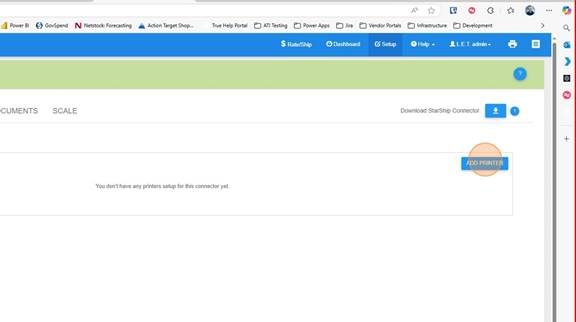
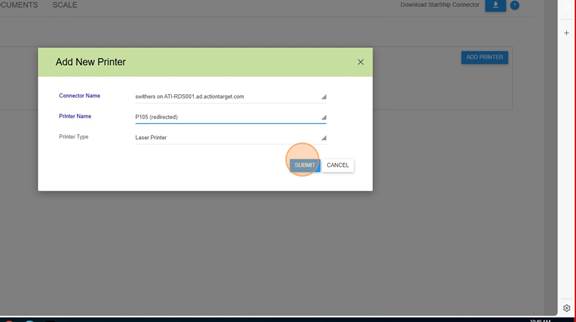
<span style="mso-fareast-font-family: Cambria; mso-fareast-theme-font: minor-latin; mso-bidi-font-family: Cambria; mso-bidi-theme-font: minor-latin;"><span style="mso-list: Ignore;">7.<span style="font: 7.0pt 'Times New Roman';"> </span></span></span>Click on "Add Printer"

<span style="mso-no-proof: yes;">![](https://wiki.actiontarget.com/uploads/images/gallery/2025-09/embedded-image-vdq4amyq.jpeg)</span>

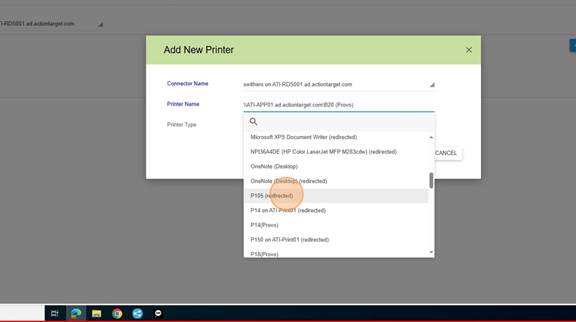
<span style="mso-fareast-font-family: Cambria; mso-fareast-theme-font: minor-latin; mso-bidi-font-family: Cambria; mso-bidi-theme-font: minor-latin;"><span style="mso-list: Ignore;">8.<span style="font: 7.0pt 'Times New Roman';"> </span></span></span>Select the Printer to add

<span style="mso-no-proof: yes;">![](https://wiki.actiontarget.com/uploads/images/gallery/2025-09/embedded-image-4w86ek9m.jpeg)</span><span style="mso-no-proof: yes;">![](https://wiki.actiontarget.com/uploads/images/gallery/2025-09/embedded-image-azywa9wn.jpeg)</span>

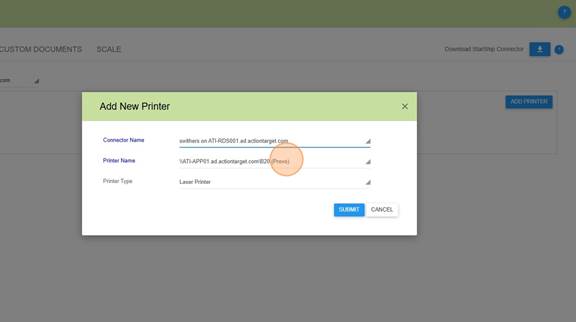
<span style="mso-fareast-font-family: Cambria; mso-fareast-theme-font: minor-latin; mso-bidi-font-family: Cambria; mso-bidi-theme-font: minor-latin;"><span style="mso-list: Ignore;">10.<span style="font: 7.0pt 'Times New Roman';"> </span></span></span>Click Submit

<span style="mso-no-proof: yes;">![](https://wiki.actiontarget.com/uploads/images/gallery/2025-09/embedded-image-knnxr5gh.jpeg)</span>

<span style="mso-fareast-font-family: Cambria; mso-fareast-theme-font: minor-latin; mso-bidi-font-family: Cambria; mso-bidi-theme-font: minor-latin;"><span style="mso-list: Ignore;">11.<span style="font: 7.0pt 'Times New Roman';"> </span></span></span>Continue until all of the Printers the user will be using are added.

# Starship Cloud  - User Print Profile

##### <span style="mso-fareast-font-family: Cambria; mso-fareast-theme-font: minor-latin; mso-bidi-font-family: Cambria; mso-bidi-theme-font: minor-latin;"><span style="mso-list: Ignore;">**The Starship Online Connector on your desktop must be setup and running on your desktop before you can do any of these steps.** </span></span>

[![image.png](https://wiki.actiontarget.com/uploads/images/gallery/2025-09/scaled-1680-/GQXimage.png)](https://wiki.actiontarget.com/uploads/images/gallery/2025-09/GQXimage.png)

Printing Profiles are used to print the correct labels and paperwork for each of the different Shipping companies that we use. In Blaine, there are 2 main profiles, one for Truck lines and one for Parcel shipments, although each station can ship both.

For purposes today, we are going to Copy the profile

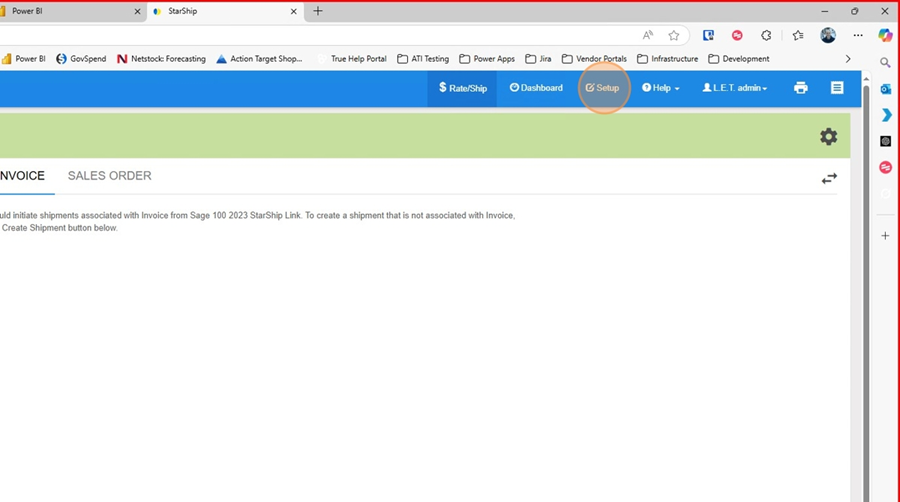
1. In Starship Cloud click on Setup

[![image.png](https://wiki.actiontarget.com/uploads/images/gallery/2025-09/scaled-1680-/7Seimage.png)](https://wiki.actiontarget.com/uploads/images/gallery/2025-09/7Seimage.png)
2\. Click on "Printing and Scale"

[![image.png](https://wiki.actiontarget.com/uploads/images/gallery/2025-09/scaled-1680-/6NAimage.png)](https://wiki.actiontarget.com/uploads/images/gallery/2025-09/6NAimage.png)
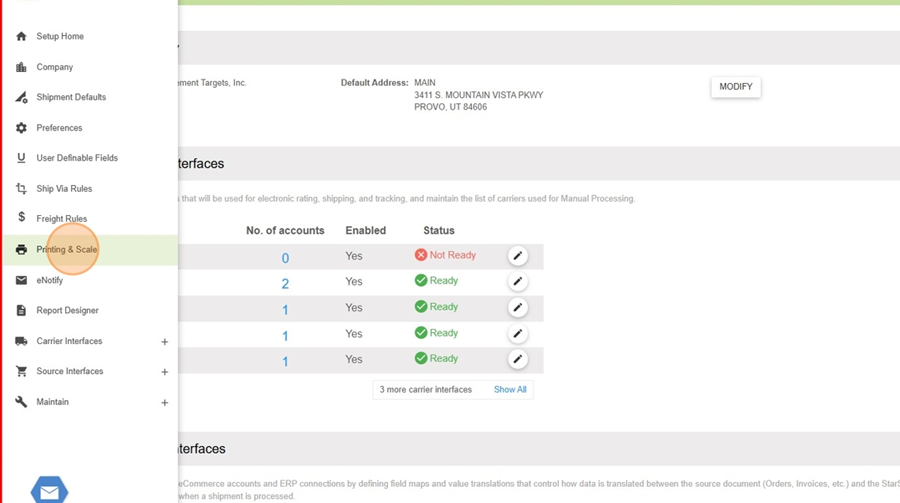
3\. Click on "Printing Profiles"

[![image.png](https://wiki.actiontarget.com/uploads/images/gallery/2025-09/scaled-1680-/N9Iimage.png)](https://wiki.actiontarget.com/uploads/images/gallery/2025-09/N9Iimage.png)
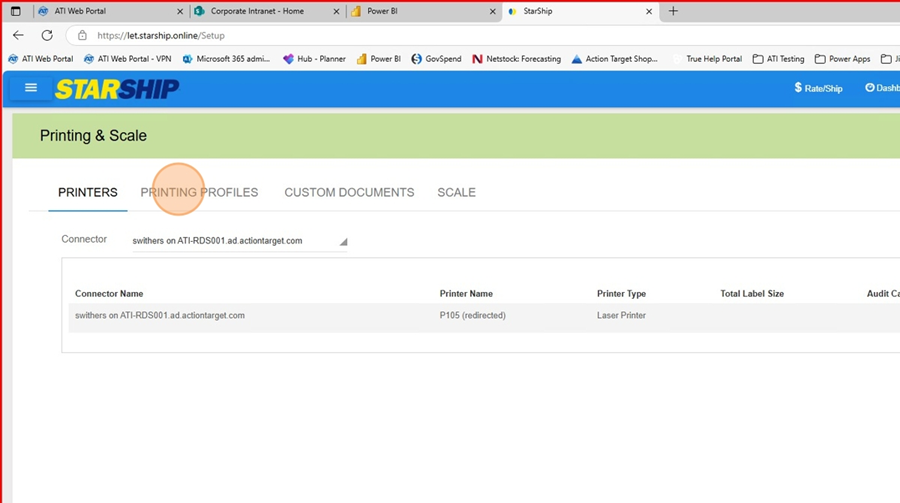
4\. Click on the Printing Profile you want to copy and then click on "Copy"

[![image.png](https://wiki.actiontarget.com/uploads/images/gallery/2025-09/scaled-1680-/us1image.png)](https://wiki.actiontarget.com/uploads/images/gallery/2025-09/us1image.png)
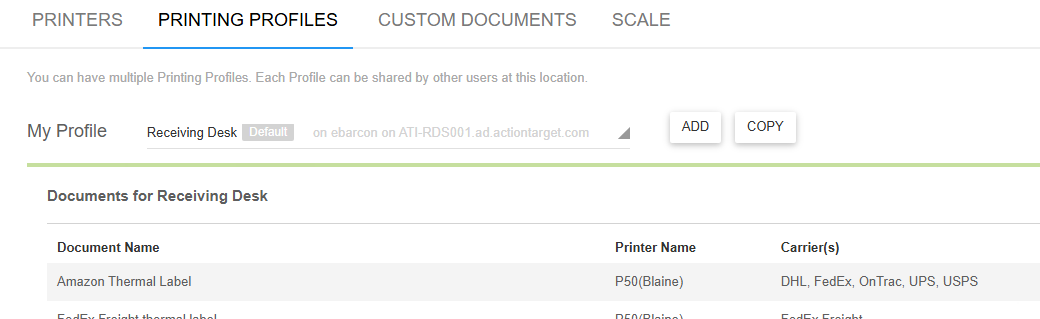
5\. Choose the connector that you want to create the profile for

[![image.png](https://wiki.actiontarget.com/uploads/images/gallery/2025-09/scaled-1680-/QJuimage.png)](https://wiki.actiontarget.com/uploads/images/gallery/2025-09/QJuimage.png)
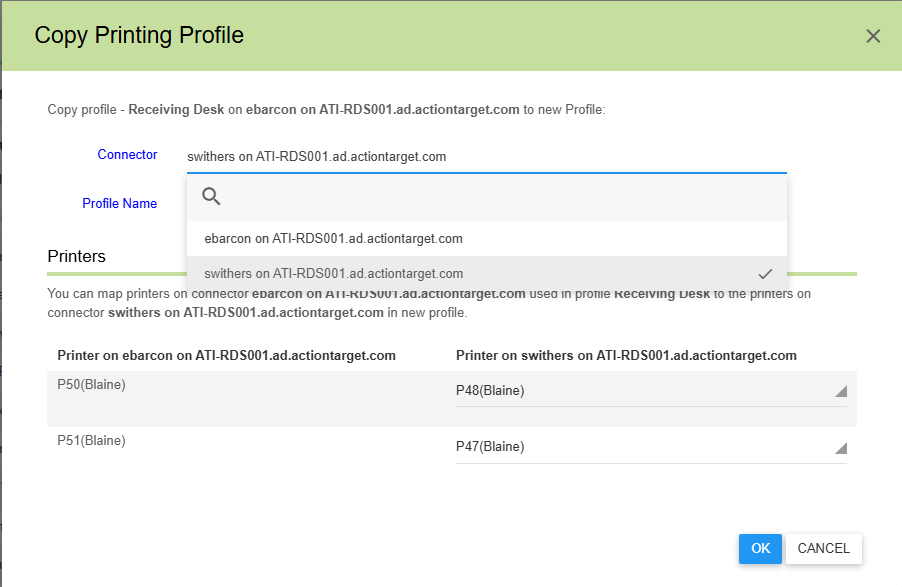
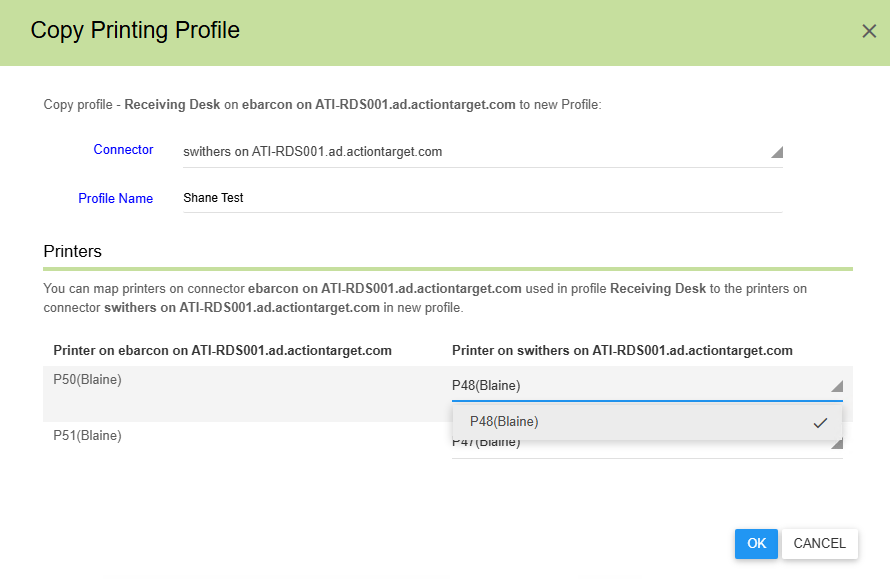
6\. Name the Profile and choose the printer you want to copy of the user.

[![image.png](https://wiki.actiontarget.com/uploads/images/gallery/2025-09/scaled-1680-/LkUimage.png)](https://wiki.actiontarget.com/uploads/images/gallery/2025-09/LkUimage.png)
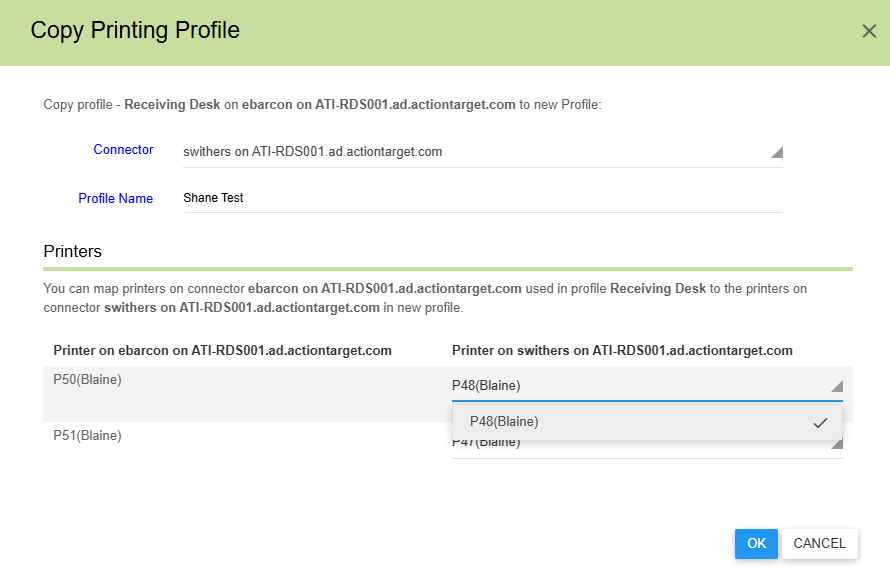
7\. Click OK and then you are done.

[![image.png](https://wiki.actiontarget.com/uploads/images/gallery/2025-09/scaled-1680-/V4Jimage.png)](https://wiki.actiontarget.com/uploads/images/gallery/2025-09/V4Jimage.png)
# Shipping

# Create a Starship Shipment with FedEx Freight Page

<span class="TextRun SCXW230053187 BCX8" data-contrast="none" lang="EN-US" xml:lang="EN-US"><span class="NormalTextRun SCXW230053187 BCX8" data-ccp-parastyle="heading 1">Create a Starship Shipment with FedEx Freight</span></span><span class="EOP SCXW230053187 BCX8" data-ccp-props="{"134245418":true,"134245529":true,"335559738":480,"335559739":0}"> </span>

<div class="SCXW230053187 BCX8" id="bkmrk-navigate-to-https%3A%2F%2F"><div class="OutlineElement Ltr SCXW230053187 BCX8">  
</div><div class="ListContainerWrapper SCXW230053187 BCX8">1. <span class="TextRun SCXW230053187 BCX8" data-contrast="auto" lang="EN-US" xml:lang="EN-US"><span class="NormalTextRun SCXW230053187 BCX8" data-ccp-parastyle="List Number">Navigate to </span></span>[<span class="TextRun Underlined SCXW230053187 BCX8" data-contrast="auto" lang="EN-US" xml:lang="EN-US"><span class="NormalTextRun SCXW230053187 BCX8" data-ccp-parastyle="List Number">https://let.starship.online/ship/Login</span></span>](https://let.starship.online/ship/Login)<span class="EOP SCXW230053187 BCX8" data-ccp-props="{"134245418":true}"> </span>

</div><div class="OutlineElement Ltr SCXW230053187 BCX8">  
</div></div><span class="SCXW230053187 BCX8"><span class="WACImageContainer NoPadding BlobObject SCXW230053187 BCX8" role="presentation">![](https://wiki.actiontarget.com/uploads/images/gallery/2025-10/embedded-image-nw9ad42f.png)</span></span><span class="EOP SCXW230053187 BCX8" data-ccp-props="{}"> </span>

<div class="SCXW230053187 BCX8" id="bkmrk-click-the-%22user-id%22-"><div class="OutlineElement Ltr SCXW230053187 BCX8">  
</div><div class="ListContainerWrapper SCXW230053187 BCX8">2. <span class="TextRun SCXW230053187 BCX8" data-contrast="auto" lang="EN-US" xml:lang="EN-US"><span class="NormalTextRun SCXW230053187 BCX8" data-ccp-parastyle="List Number">Click the "User ID" field.</span></span><span class="EOP SCXW230053187 BCX8" data-ccp-props="{"134245418":true}"> </span>

</div><div class="OutlineElement Ltr SCXW230053187 BCX8">  
</div></div><span class="SCXW230053187 BCX8"><span class="WACImageContainer NoPadding BlobObject SCXW230053187 BCX8" role="presentation">![](https://wiki.actiontarget.com/uploads/images/gallery/2025-10/embedded-image-y8gmihnu.png)</span></span><span class="EOP SCXW230053187 BCX8" data-ccp-props="{}"> </span>

<div class="SCXW230053187 BCX8" id="bkmrk-click-here.%C2%A0"><div class="OutlineElement Ltr SCXW230053187 BCX8">  
</div><div class="ListContainerWrapper SCXW230053187 BCX8">3. <span class="TextRun SCXW230053187 BCX8" data-contrast="auto" lang="EN-US" xml:lang="EN-US"><span class="NormalTextRun SCXW230053187 BCX8" data-ccp-parastyle="List Number">Click here.</span></span><span class="EOP SCXW230053187 BCX8" data-ccp-props="{"134245418":true}"> </span>

</div><div class="OutlineElement Ltr SCXW230053187 BCX8">  
</div></div><span class="SCXW230053187 BCX8"><span class="WACImageContainer NoPadding BlobObject SCXW230053187 BCX8" role="presentation">![](https://wiki.actiontarget.com/uploads/images/gallery/2025-10/embedded-image-4n444zrc.png)</span></span><span class="EOP SCXW230053187 BCX8" data-ccp-props="{}"> </span>

<div class="SCXW230053187 BCX8" id="bkmrk-click-%22sage-100-2021"><div class="OutlineElement Ltr SCXW230053187 BCX8">  
</div><div class="ListContainerWrapper SCXW230053187 BCX8">4. <span class="TextRun SCXW230053187 BCX8" data-contrast="auto" lang="EN-US" xml:lang="EN-US"><span class="NormalTextRun SCXW230053187 BCX8" data-ccp-parastyle="List Number">Click "Sage 100 2021 - 2025"</span></span><span class="EOP SCXW230053187 BCX8" data-ccp-props="{"134245418":true}"> </span>

</div><div class="OutlineElement Ltr SCXW230053187 BCX8">  
</div></div><span class="SCXW230053187 BCX8"><span class="WACImageContainer NoPadding BlobObject SCXW230053187 BCX8" role="presentation">![](https://wiki.actiontarget.com/uploads/images/gallery/2025-10/embedded-image-xtkhelxk.png)</span></span><span class="EOP SCXW230053187 BCX8" data-ccp-props="{}"> </span>

<div class="SCXW230053187 BCX8" id="bkmrk-click-%22create-shipme"><div class="OutlineElement Ltr SCXW230053187 BCX8">  
</div><div class="ListContainerWrapper SCXW230053187 BCX8">5. <span class="TextRun SCXW230053187 BCX8" data-contrast="auto" lang="EN-US" xml:lang="EN-US"><span class="NormalTextRun SCXW230053187 BCX8" data-ccp-parastyle="List Number">Click "Create Shipment"</span></span><span class="EOP SCXW230053187 BCX8" data-ccp-props="{"134245418":true}"> </span>

</div><div class="OutlineElement Ltr SCXW230053187 BCX8">  
</div></div><span class="SCXW230053187 BCX8"><span class="WACImageContainer NoPadding BlobObject SCXW230053187 BCX8" role="presentation">![](https://wiki.actiontarget.com/uploads/images/gallery/2025-10/embedded-image-yatw9npu.png)</span></span><span class="EOP SCXW230053187 BCX8" data-ccp-props="{}"> </span>

<div class="SCXW230053187 BCX8" id="bkmrk-update-the-recipient"><div class="OutlineElement Ltr SCXW230053187 BCX8">  
</div><div class="ListContainerWrapper SCXW230053187 BCX8">6. <span class="TextRun SCXW230053187 BCX8" data-contrast="auto" lang="EN-US" xml:lang="EN-US"><span class="NormalTextRun SCXW230053187 BCX8" data-ccp-parastyle="List Number">Update the Recipient</span></span><span class="EOP SCXW230053187 BCX8" data-ccp-props="{"134245418":true}"> </span>

</div><div class="OutlineElement Ltr SCXW230053187 BCX8">  
</div></div><span class="SCXW230053187 BCX8"><span class="WACImageContainer NoPadding BlobObject SCXW230053187 BCX8" role="presentation">![](https://wiki.actiontarget.com/uploads/images/gallery/2025-10/embedded-image-ub4ircpc.png)</span></span><span class="EOP SCXW230053187 BCX8" data-ccp-props="{}"> </span>

<div class="SCXW230053187 BCX8" id="bkmrk-fill-out-the-recipie"><div class="OutlineElement Ltr SCXW230053187 BCX8">  
</div><div class="ListContainerWrapper SCXW230053187 BCX8">7. <span class="TextRun SCXW230053187 BCX8" data-contrast="auto" lang="EN-US" xml:lang="EN-US"><span class="NormalTextRun SCXW230053187 BCX8" data-ccp-parastyle="List Number">Fill out the Recipient Address</span></span><span class="EOP SCXW230053187 BCX8" data-ccp-props="{"134245418":true}"> </span>

</div><div class="OutlineElement Ltr SCXW230053187 BCX8">  
</div></div><span class="SCXW230053187 BCX8"><span class="WACImageContainer NoPadding BlobObject SCXW230053187 BCX8" role="presentation">![](https://wiki.actiontarget.com/uploads/images/gallery/2025-10/embedded-image-dcm200ss.png)</span></span><span class="EOP SCXW230053187 BCX8" data-ccp-props="{}"> </span>

<div class="SCXW230053187 BCX8" id="bkmrk-click-here.%C2%A0-1"><div class="OutlineElement Ltr SCXW230053187 BCX8">  
</div><div class="ListContainerWrapper SCXW230053187 BCX8">8. <span class="TextRun SCXW230053187 BCX8" data-contrast="auto" lang="EN-US" xml:lang="EN-US"><span class="NormalTextRun SCXW230053187 BCX8" data-ccp-parastyle="List Number">Click here.</span></span><span class="EOP SCXW230053187 BCX8" data-ccp-props="{"134245418":true}"> </span>

</div><div class="OutlineElement Ltr SCXW230053187 BCX8">  
</div></div><span class="SCXW230053187 BCX8"><span class="WACImageContainer NoPadding BlobObject SCXW230053187 BCX8" role="presentation">![](https://wiki.actiontarget.com/uploads/images/gallery/2025-10/embedded-image-k3yal4xm.png)</span></span><span class="EOP SCXW230053187 BCX8" data-ccp-props="{}"> </span>

<div class="SCXW230053187 BCX8" id="bkmrk-click-on-transportat"><div class="OutlineElement Ltr SCXW230053187 BCX8">  
</div><div class="ListContainerWrapper SCXW230053187 BCX8">9. <span class="TextRun SCXW230053187 BCX8" data-contrast="auto" lang="EN-US" xml:lang="EN-US"><span class="NormalTextRun SCXW230053187 BCX8" data-ccp-parastyle="List Number">Click on Transportation</span></span><span class="LineBreakBlob BlobObject DragDrop SCXW230053187 BCX8"><span class="SCXW230053187 BCX8"> </span>  
    </span><span class="TextRun SCXW230053187 BCX8" data-contrast="auto" lang="EN-US" xml:lang="EN-US"><span class="NormalTextRun SCXW230053187 BCX8" data-ccp-parastyle="List Number">Click "Select a Carrier"</span></span><span class="EOP SCXW230053187 BCX8" data-ccp-props="{"134245418":true}"> </span>

</div><div class="OutlineElement Ltr SCXW230053187 BCX8">  
</div></div><span class="SCXW230053187 BCX8"><span class="WACImageContainer NoPadding BlobObject SCXW230053187 BCX8" role="presentation">![](https://wiki.actiontarget.com/uploads/images/gallery/2025-10/embedded-image-wqesm2ya.png)</span></span><span class="EOP SCXW230053187 BCX8" data-ccp-props="{}"> </span>

<div class="SCXW230053187 BCX8" id="bkmrk-click-%22fedex-freight"><div class="OutlineElement Ltr SCXW230053187 BCX8">  
</div><div class="ListContainerWrapper SCXW230053187 BCX8">10. <span class="TextRun SCXW230053187 BCX8" data-contrast="auto" lang="EN-US" xml:lang="EN-US"><span class="NormalTextRun SCXW230053187 BCX8" data-ccp-parastyle="List Number">Click "FedEx Freight"</span></span><span class="EOP SCXW230053187 BCX8" data-ccp-props="{"134245418":true}"> </span>

</div></div><span class="SCXW230053187 BCX8"><span class="WACImageContainer NoPadding BlobObject SCXW230053187 BCX8" role="presentation">![](https://wiki.actiontarget.com/uploads/images/gallery/2025-10/embedded-image-uu1poh5e.png)</span></span><span class="EOP SCXW230053187 BCX8" data-ccp-props="{}"> </span>

<div class="SCXW230053187 BCX8" id="bkmrk-click-this-button.%C2%A0"><div class="OutlineElement Ltr SCXW230053187 BCX8">  
</div><div class="ListContainerWrapper SCXW230053187 BCX8">11. <span class="TextRun SCXW230053187 BCX8" data-contrast="auto" lang="EN-US" xml:lang="EN-US"><span class="NormalTextRun SCXW230053187 BCX8" data-ccp-parastyle="List Number">Click this button.</span></span><span class="EOP SCXW230053187 BCX8" data-ccp-props="{"134245418":true}"> </span>

</div><div class="OutlineElement Ltr SCXW230053187 BCX8">  
</div></div><span class="SCXW230053187 BCX8"><span class="WACImageContainer NoPadding BlobObject SCXW230053187 BCX8" role="presentation">![](https://wiki.actiontarget.com/uploads/images/gallery/2025-10/embedded-image-9g4mcroq.png)</span></span><span class="EOP SCXW230053187 BCX8" data-ccp-props="{}"> </span>

<div class="SCXW230053187 BCX8" id="bkmrk-fill-in-the-weight%2C-"><div class="OutlineElement Ltr SCXW230053187 BCX8">  
</div><div class="ListContainerWrapper SCXW230053187 BCX8">12. <span class="TextRun SCXW230053187 BCX8" data-contrast="auto" lang="EN-US" xml:lang="EN-US"><span class="NormalTextRun SCXW230053187 BCX8" data-ccp-parastyle="List Number">Fill in the Weight, Length, Width and Height</span></span><span class="EOP SCXW230053187 BCX8" data-ccp-props="{"134245418":true}"> </span>

</div></div><span class="EOP SCXW230053187 BCX8" data-ccp-props="{}"> </span>

[![image.png](https://wiki.actiontarget.com/uploads/images/gallery/2025-10/scaled-1680-/oMTimage.png)](https://wiki.actiontarget.com/uploads/images/gallery/2025-10/oMTimage.png)

<div class="SCXW230053187 BCX8" id="bkmrk-click-%22select-a-grou"><div class="OutlineElement Ltr SCXW230053187 BCX8">  
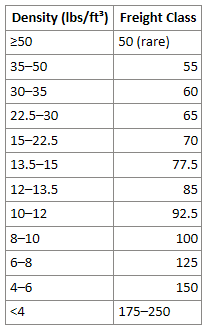
</div><div class="ListContainerWrapper SCXW230053187 BCX8">13. <span class="TextRun SCXW230053187 BCX8" data-contrast="auto" lang="EN-US" xml:lang="EN-US"><span class="NormalTextRun SCXW230053187 BCX8" data-ccp-parastyle="List Number">Click "Select a group" based on the Density field next to the Group. Use this table to choose the correct group.</span></span><span class="EOP SCXW230053187 BCX8" data-ccp-props="{"134245418":true}"> </span>
    
    
    1. [![image.png](https://wiki.actiontarget.com/uploads/images/gallery/2025-10/scaled-1680-/Ljdimage.png)](https://wiki.actiontarget.com/uploads/images/gallery/2025-10/Ljdimage.png)

</div><div class="OutlineElement Ltr SCXW230053187 BCX8">  
</div></div>[![image.png](https://wiki.actiontarget.com/uploads/images/gallery/2025-10/scaled-1680-/B7Vimage.png)](https://wiki.actiontarget.com/uploads/images/gallery/2025-10/B7Vimage.png)

<div class="SCXW230053187 BCX8" id="bkmrk--2"><div class="OutlineElement Ltr SCXW230053187 BCX8">  
</div></div><span class="EOP SCXW230053187 BCX8" data-ccp-props="{}"> </span>

<div class="SCXW230053187 BCX8" id="bkmrk-choose-the-correct-f"><div class="OutlineElement Ltr SCXW230053187 BCX8">  
</div><div class="ListContainerWrapper SCXW230053187 BCX8">14. <span class="TextRun SCXW230053187 BCX8" data-contrast="auto" lang="EN-US" xml:lang="EN-US"><span class="NormalTextRun SCXW230053187 BCX8" data-ccp-parastyle="List Number">Choose the correct freight class</span></span><span class="EOP SCXW230053187 BCX8" data-ccp-props="{"134245418":true}"> </span>

</div><div class="OutlineElement Ltr SCXW230053187 BCX8">  
</div></div>[![image.png](https://wiki.actiontarget.com/uploads/images/gallery/2025-10/scaled-1680-/pjzimage.png)](https://wiki.actiontarget.com/uploads/images/gallery/2025-10/pjzimage.png)

<div class="SCXW230053187 BCX8" id="bkmrk--4"></div><div class="SCXW230053187 BCX8" id="bkmrk-open-up-the-pallet%C2%A0"><div class="ListContainerWrapper SCXW230053187 BCX8">15. <span class="TextRun SCXW230053187 BCX8" data-contrast="auto" lang="EN-US" xml:lang="EN-US"><span class="NormalTextRun AdvancedProofingIssueV2Themed SCXW230053187 BCX8" data-ccp-parastyle="List Number">Open up</span><span class="NormalTextRun SCXW230053187 BCX8" data-ccp-parastyle="List Number"> the pallet</span></span><span class="EOP SCXW230053187 BCX8" data-ccp-props="{"134245418":true}"> </span>

</div><div class="OutlineElement Ltr SCXW230053187 BCX8">  
</div></div>[![image.png](https://wiki.actiontarget.com/uploads/images/gallery/2025-10/scaled-1680-/wJ1image.png)](https://wiki.actiontarget.com/uploads/images/gallery/2025-10/wJ1image.png)

<div class="SCXW230053187 BCX8" id="bkmrk--6"><div class="OutlineElement Ltr SCXW230053187 BCX8">  
</div></div><span class="EOP SCXW230053187 BCX8" data-ccp-props="{}"> </span>

<div class="SCXW230053187 BCX8" id="bkmrk-choose-the-appropria"><div class="OutlineElement Ltr SCXW230053187 BCX8">  
</div><div class="ListContainerWrapper SCXW230053187 BCX8">16. <span class="TextRun SCXW230053187 BCX8" data-contrast="auto" lang="EN-US" xml:lang="EN-US"><span class="NormalTextRun SCXW230053187 BCX8" data-ccp-parastyle="List Number">Choose the </span><span class="NormalTextRun SCXW230053187 BCX8" data-ccp-parastyle="List Number">appropriate group</span><span class="NormalTextRun SCXW230053187 BCX8" data-ccp-parastyle="List Number"> for the package</span></span><span class="EOP SCXW230053187 BCX8" data-ccp-props="{"134245418":true}"> </span>

</div><div class="OutlineElement Ltr SCXW230053187 BCX8">  
</div></div>[![image.png](https://wiki.actiontarget.com/uploads/images/gallery/2025-10/scaled-1680-/ITuimage.png)](https://wiki.actiontarget.com/uploads/images/gallery/2025-10/ITuimage.png)

<div class="SCXW230053187 BCX8" id="bkmrk--8"><div class="OutlineElement Ltr SCXW230053187 BCX8">  
</div></div><span class="EOP SCXW230053187 BCX8" data-ccp-props="{}"> </span>

<div class="SCXW230053187 BCX8" id="bkmrk-click-%22freight-class"><div class="OutlineElement Ltr SCXW230053187 BCX8">  
</div><div class="ListContainerWrapper SCXW230053187 BCX8">17. <span class="TextRun SCXW230053187 BCX8" data-contrast="auto" lang="EN-US" xml:lang="EN-US"><span class="NormalTextRun SCXW230053187 BCX8" data-ccp-parastyle="List Number">Click "Freight Class 60"</span></span><span class="EOP SCXW230053187 BCX8" data-ccp-props="{"134245418":true}"> </span>

</div><div class="OutlineElement Ltr SCXW230053187 BCX8">  
</div></div>[![image.png](https://wiki.actiontarget.com/uploads/images/gallery/2025-10/scaled-1680-/xEOimage.png)](https://wiki.actiontarget.com/uploads/images/gallery/2025-10/xEOimage.png)

<div class="SCXW230053187 BCX8" id="bkmrk--10"><div class="OutlineElement Ltr SCXW230053187 BCX8">  
</div></div><span class="EOP SCXW230053187 BCX8" data-ccp-props="{}"> </span>

<div class="SCXW230053187 BCX8" id="bkmrk-click-%22freight-ltl-s"><div class="OutlineElement Ltr SCXW230053187 BCX8">  
</div><div class="ListContainerWrapper SCXW230053187 BCX8">18. <span class="TextRun SCXW230053187 BCX8" data-contrast="auto" lang="EN-US" xml:lang="EN-US"><span class="NormalTextRun SCXW230053187 BCX8" data-ccp-parastyle="List Number">Click "FREIGHT LTL SHIP"</span></span><span class="EOP SCXW230053187 BCX8" data-ccp-props="{"134245418":true}"> </span>

</div><div class="OutlineElement Ltr SCXW230053187 BCX8">  
</div></div>[![image.png](https://wiki.actiontarget.com/uploads/images/gallery/2025-10/scaled-1680-/kgMimage.png)](https://wiki.actiontarget.com/uploads/images/gallery/2025-10/kgMimage.png)

<div class="SCXW230053187 BCX8" id="bkmrk--12"><div class="OutlineElement Ltr SCXW230053187 BCX8">  
</div></div><span class="EOP SCXW230053187 BCX8" data-ccp-props="{}"> </span>

<div class="SCXW230053187 BCX8" id="bkmrk-click-%22run%22%C2%A0"><div class="OutlineElement Ltr SCXW230053187 BCX8">  
</div><div class="ListContainerWrapper SCXW230053187 BCX8">19. <span class="TextRun SCXW230053187 BCX8" data-contrast="auto" lang="EN-US" xml:lang="EN-US"><span class="NormalTextRun SCXW230053187 BCX8" data-ccp-parastyle="List Number">Click "Run"</span></span><span class="EOP SCXW230053187 BCX8" data-ccp-props="{"134245418":true}"> </span>

</div><div class="OutlineElement Ltr SCXW230053187 BCX8">  
</div></div>[![image.png](https://wiki.actiontarget.com/uploads/images/gallery/2025-10/scaled-1680-/jWiimage.png)](https://wiki.actiontarget.com/uploads/images/gallery/2025-10/jWiimage.png)

<div class="SCXW230053187 BCX8" id="bkmrk--14"><div class="OutlineElement Ltr SCXW230053187 BCX8">  
</div></div><span class="EOP SCXW230053187 BCX8" data-ccp-props="{}"> </span>

<div class="SCXW230053187 BCX8" id="bkmrk-click-%22run%22%C2%A0-1"><div class="OutlineElement Ltr SCXW230053187 BCX8">  
</div><div class="ListContainerWrapper SCXW230053187 BCX8">20. <span class="TextRun SCXW230053187 BCX8" data-contrast="auto" lang="EN-US" xml:lang="EN-US"><span class="NormalTextRun SCXW230053187 BCX8" data-ccp-parastyle="List Number">Click "Run"</span></span><span class="EOP SCXW230053187 BCX8" data-ccp-props="{"134245418":true}"> </span>

</div></div><span class="EOP SCXW230053187 BCX8" data-ccp-props="{}"> </span>

[![image.png](https://wiki.actiontarget.com/uploads/images/gallery/2025-10/scaled-1680-/L0aimage.png)](https://wiki.actiontarget.com/uploads/images/gallery/2025-10/L0aimage.png)

<div class="SCXW230053187 BCX8" id="bkmrk-click-%22ok%22%C2%A0"><div class="OutlineElement Ltr SCXW230053187 BCX8">  
</div><div class="ListContainerWrapper SCXW230053187 BCX8">21. <span class="TextRun SCXW230053187 BCX8" data-contrast="auto" lang="EN-US" xml:lang="EN-US"><span class="NormalTextRun SCXW230053187 BCX8" data-ccp-parastyle="List Number">Click "OK"</span></span><span class="EOP SCXW230053187 BCX8" data-ccp-props="{"134245418":true}"> </span>

</div><div class="OutlineElement Ltr SCXW230053187 BCX8">  
</div></div><span class="SCXW230053187 BCX8"><span class="WACImageContainer NoPadding BlobObject SCXW230053187 BCX8" role="presentation">![](https://wiki.actiontarget.com/uploads/images/gallery/2025-10/embedded-image-6ykngr5t.png)</span></span><span class="EOP SCXW230053187 BCX8" data-ccp-props="{}"></span>

# Shipping to APO, FPO, and DPO Addresses

# <span role="text">**Standard Operating Procedure (SOP)**</span>

## Shipping to APO / FPO / DPO Addresses

---

## <span role="text">**1. Scope and Definitions**</span>

**APO / FPO / DPO**  
Military mail destinations. These are handled through USPS regardless of physical overseas location.

- **APO** – Army / Air Force Post Office
- **FPO** – Fleet Post Office (Navy / Marines)
- **DPO** – Diplomatic Post Office

**Key Rule:**  
All APO/FPO/DPO shipments are treated as **USPS shipments**, not FedEx, UPS, or DHL.

---

## <span role="text">**2. Shipment Type Decision**</span>

Before quoting or processing, determine shipment type:

### <span role="text">**A. Small Parcel Shipment (Standard Process)**</span>

Use USPS directly when:

- Shipment consists of **individual boxes**
- Total shipment is manageable (typically &lt; ~10–15 boxes)
- No palletization required

### <span role="text">**B. Large Shipment (Consolidation Required)**</span>

Use consolidation when:

- Shipment is **palletized** or large volume
- Example: 
    - 1,000 backers + 5,000 targets
    - 20+ boxes
- USPS direct shipment becomes inefficient or cost-prohibitive

---

## <span role="text">**3. Small Parcel Workflow (USPS Direct)**</span>

### <span role="text">**Step 1: Prepare Box Data**</span>

For each box:

- Measure **dimensions (L × W × H)**
- Determine **weight**
- Identify contents (if needed for internal reference)

**Important Rules:**

- Each box must be processed **individually**
- USPS does **not support multi-box quoting in a single entry**
- Even identical boxes must be entered separately (or calculated once and multiplied)

---

### <span role="text">**Step 2: Use USPS Rate Calculator**</span>

Navigate to: **USPS.com → Calculate a Price**

Input:

- **Ship From ZIP Code:** `55449` (Action Target) *(confirm if needed)*
- **Ship To:**
    - City: APO / FPO / DPO
    - State: AE / AP / AA (auto-populates)
    - ZIP: Provided by customer (e.g., 09439)

---

### <span role="text">**Step 3: Enter Package Details**</span>

For each box:

- Weight
- Dimensions
- Quantity = 1

Repeat for each box OR:

- If identical boxes: 
    - Calculate **one box**
    - Multiply cost by total quantity

---

### <span role="text">**Step 4: Select Service Type**</span>

General guidance:

- **USPS Priority Mail** → Preferred for APO/FPO/DPO
- **USPS Retail Ground / Standard** → Rarely used for military mail

**Note:**

- APO/FPO/DPO is technically treated as domestic mail but behaves like international
- Priority typically offers better reliability

---

### <span role="text">**Step 5: Calculate Total Shipping Cost**</span>

- Sum all individual box costs

---

### <span role="text">**Step 6: Apply Markup**</span>

Apply standard margin:

- Typical: **10%–20%**

---

### <span role="text">**Step 7: Provide Quote**</span>

Deliver:

- Total shipping cost (with markup)
- Service type (Priority recommended)

---

## <span role="text">**4. Large Shipment Workflow (Consolidation Required)**</span>

### <span role="text">**Step 1: Identify Consolidation Need**</span>

Trigger conditions:

- Pallet shipment
- Excessive number of boxes
- High USPS cost or labor burden

---

### <span role="text">**Step 2: Contact Customer**</span>

Request the following:

> “Please provide a **stateside consolidation point address** and all required routing information for forwarding to your unit.”

---

### <span role="text">**Step 3: Required Customer Information**</span>

Customer must provide:

- Consolidation point address (U.S.-based)
- Unit information (final destination)
- Required identifiers (if applicable): 
    - TCN number
    - DSN number
    - Unit number
    - Contact name (e.g., John Doe)
- Any special labeling instructions

---

### <span role="text">**Step 4: Create Sales Order**</span>

#### <span role="text">**Ship-To Address**</span>

- Enter **consolidation point address**

#### <span role="text">**Order Notes**</span>

Include ALL provided routing data:

- Final APO/FPO/DPO destination
- Unit identifiers
- Contact details
- Any special instructions

**Principle:**  
More information is always better for downstream handling.

---

### <span role="text">**Step 5: Create Shipment Placard (Required)**</span>

Create a document (Word or equivalent) containing:

- Final destination (APO/FPO/DPO)
- Unit information
- TCM / DSN / routing numbers
- Contact name

---

### <span role="text">**Step 6: Labeling and Placement**</span>

For palletized shipments:

- Print placard
- Attach: 
    - **Front of pallet**
    - **Back of pallet**

---

### <span role="text">**Step 7: Shipment Execution**</span>

- Ship to **consolidation point via standard domestic carrier - may be any LTL carrier.**
- After delivery: 
    - Consolidator assumes responsibility
    - They route shipment to final APO/FPO/DPO destination

---

## <span role="text">**5. How Consolidation Routing Works**</span>

The consolidator determines final routing based on:

- Information on placard
- Sales order / packing slip data
- Internal military logistics systems

**Key Insight:**  
You do NOT control final leg routing.  
Your responsibility is to provide **complete and accurate data**.

---

## <span role="text">**6. Edge Cases and Exceptions**</span>

### <span role="text">**A. Customer Insists on Direct USPS (Large Order)**</span>

- Possible but inefficient
- Requires: 
    - Manual calculation of every box
    - Potentially very high cost (e.g., $8,000+)
- Proceed only with customer approval

---

### <span role="text">**B. Customer Does Not Know Consolidation Process**</span>

Guide them:

> “Please check with your logistics or supply chain contact for a consolidation shipping address and required routing information.”

---

### <span role="text">**C. Mixed Box Types**</span>

If boxes differ:

- Each must be calculated separately
- No batching allowed

---

## <span role="text">**7. Key Rules Summary**</span>

- USPS is **mandatory** for APO/FPO/DPO
- No FedEx, UPS, or DHL
- Each box must be **quoted individually**
- Large shipments require **consolidation**
- Always **collect routing data from customer**
- Always **include redundant labeling**

---

## <span role="text">**8. Quick Decision Flow**</span>

1. Is shipment small (few boxes)? 
    - YES → USPS direct
    - NO → Go to consolidation
2. Is shipment palletized or large volume? 
    - YES → Request consolidation point
    - NO → USPS direct

---

## <span role="text">**9. Operational Best Practices**</span>

- Always over-communicate shipping constraints
- Avoid underestimating labor for large USPS shipments
- Default to consolidation for anything non-trivial
- Include redundant routing info on: 
    - Sales order
    - Packing slip
    - Physical labels

# Basic Shipping Quote Training

Follow steps in SAGE and StarShip to create a basic quote for shipping to add to a customer quote.

# New Page