# Starship Cloud - User Connector Config

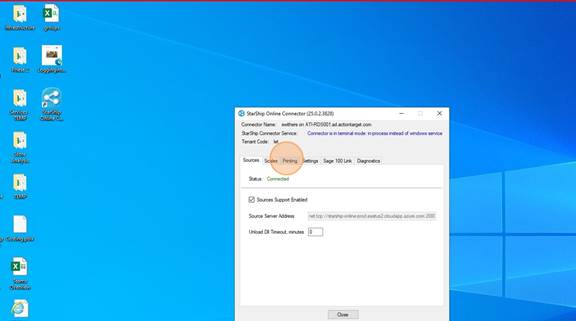
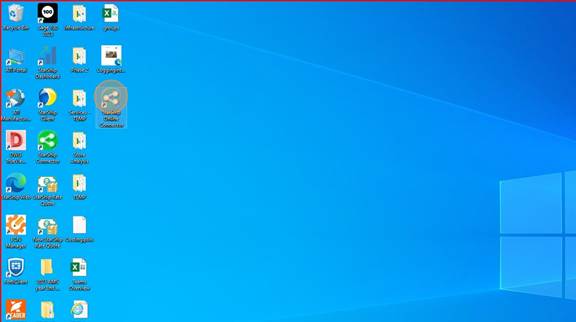
<span style="mso-fareast-font-family: Cambria; mso-fareast-theme-font: minor-latin; mso-bidi-font-family: Cambria; mso-bidi-theme-font: minor-latin;"><span style="mso-list: Ignore;">1.<span style="font: 7.0pt 'Times New Roman';"> </span></span></span>Double-click on "Starship Online Connector"
<span style="mso-no-proof: yes;">![](https://wiki.actiontarget.com/uploads/images/gallery/2025-09/embedded-image-khshlaes.jpeg)</span>

<span style="mso-fareast-font-family: Cambria; mso-fareast-theme-font: minor-latin; mso-bidi-font-family: Cambria; mso-bidi-theme-font: minor-latin;"><span style="mso-list: Ignore;">2.<span style="font: 7.0pt 'Times New Roman';"> </span></span></span>Click on the "Printing" tab

<span style="mso-no-proof: yes;">![](https://wiki.actiontarget.com/uploads/images/gallery/2025-09/embedded-image-x69gr5gv.jpeg)</span>

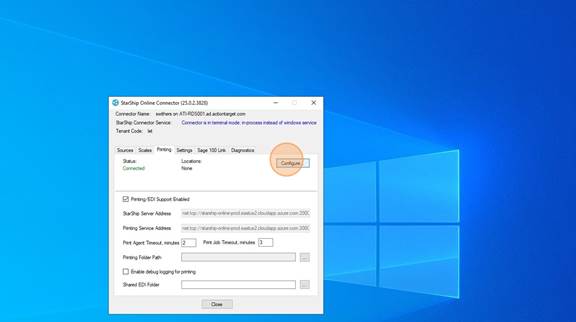
<span style="mso-fareast-font-family: Cambria; mso-fareast-theme-font: minor-latin; mso-bidi-font-family: Cambria; mso-bidi-theme-font: minor-latin;"><span style="mso-list: Ignore;">3.<span style="font: 7.0pt 'Times New Roman';"> </span></span></span>Click on "Configure"

<span style="mso-no-proof: yes;">![](https://wiki.actiontarget.com/uploads/images/gallery/2025-09/embedded-image-nnnxx8qu.jpeg)</span>

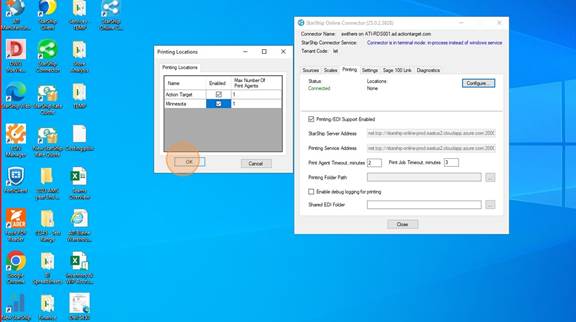
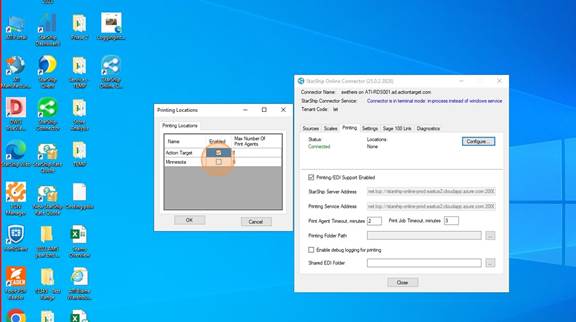
<span style="mso-fareast-font-family: Cambria; mso-fareast-theme-font: minor-latin; mso-bidi-font-family: Cambria; mso-bidi-theme-font: minor-latin;"><span style="mso-list: Ignore;">4.<span style="font: 7.0pt 'Times New Roman';"> </span></span></span>Choose the location (s) where the User will be shipping from. You can choose multiple locations.
<span style="mso-no-proof: yes;">![](https://wiki.actiontarget.com/uploads/images/gallery/2025-09/embedded-image-xqnqnhma.jpeg)</span>

<span style="mso-fareast-font-family: Cambria; mso-fareast-theme-font: minor-latin; mso-bidi-font-family: Cambria; mso-bidi-theme-font: minor-latin;"><span style="mso-list: Ignore;">5.<span style="font: 7.0pt 'Times New Roman';"> </span></span></span>Click "OK"

<span style="mso-no-proof: yes;">![](https://wiki.actiontarget.com/uploads/images/gallery/2025-09/embedded-image-nvgdmkzn.jpeg)</span>

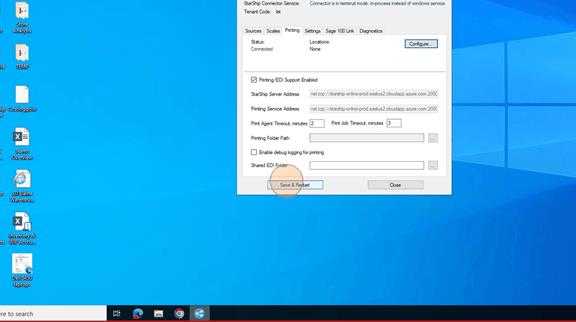
<span style="mso-fareast-font-family: Cambria; mso-fareast-theme-font: minor-latin; mso-bidi-font-family: Cambria; mso-bidi-theme-font: minor-latin;"><span style="mso-list: Ignore;">6.<span style="font: 7.0pt 'Times New Roman';"> </span></span></span>Click on "Save and Restart". Then wait until the Staus shows Connected and the location(s) are in there with Active next to them.
<span style="mso-no-proof: yes;">![](https://wiki.actiontarget.com/uploads/images/gallery/2025-09/embedded-image-sgls4x7b.png)</span>

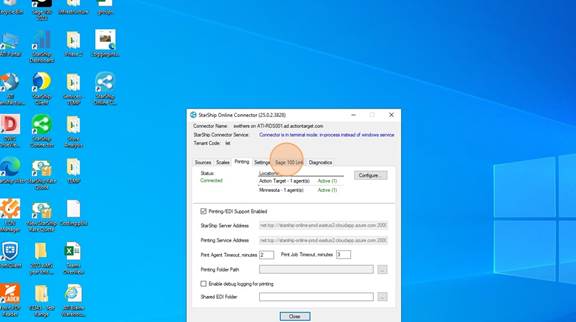
<span style="mso-fareast-font-family: Cambria; mso-fareast-theme-font: minor-latin; mso-bidi-font-family: Cambria; mso-bidi-theme-font: minor-latin;"><span style="mso-list: Ignore;">7.<span style="font: 7.0pt 'Times New Roman';"> </span></span></span>Once it looks like below with the location(s)<span style="mso-spacerun: yes;"> </span>and the Active showing, you are done here. DO NOT CLOSE the Connector. This MUST STAY OPEN while you are using Starship Cloud. It can be minimized.
<span style="mso-no-proof: yes;">![](https://wiki.actiontarget.com/uploads/images/gallery/2025-09/embedded-image-b8uqunkr.jpeg)</span>

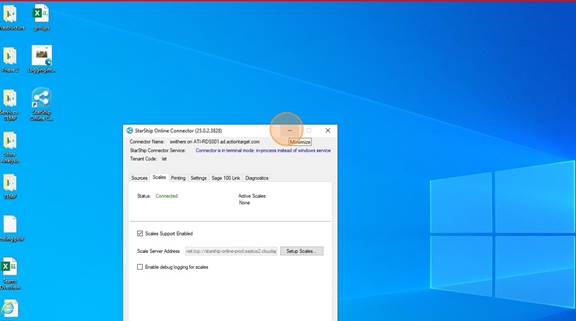
<span style="mso-fareast-font-family: Cambria; mso-fareast-theme-font: minor-latin; mso-bidi-font-family: Cambria; mso-bidi-theme-font: minor-latin;"><span style="mso-list: Ignore;">8.<span style="font: 7.0pt 'Times New Roman';"> </span></span></span>MINIMIZE the window

<span style="mso-no-proof: yes;">![](https://wiki.actiontarget.com/uploads/images/gallery/2025-09/embedded-image-9rtnsucj.jpeg)</span>

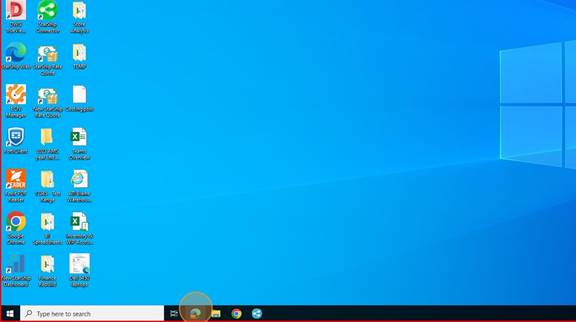
<span style="mso-fareast-font-family: Cambria; mso-fareast-theme-font: minor-latin; mso-bidi-font-family: Cambria; mso-bidi-theme-font: minor-latin;"><span style="mso-list: Ignore;">9.<span style="font: 7.0pt 'Times New Roman';"> </span></span></span>Open a browser

<span style="mso-no-proof: yes;">![](https://wiki.actiontarget.com/uploads/images/gallery/2025-09/embedded-image-sdhtk14p.jpeg)</span>

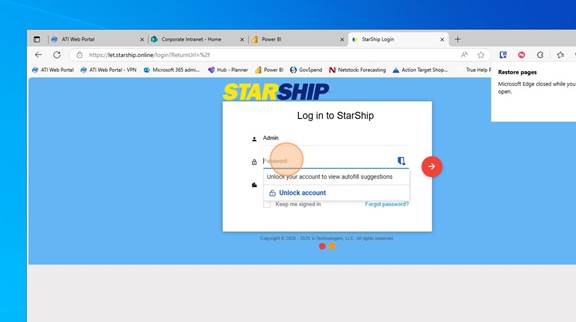
<span style="mso-fareast-font-family: Cambria; mso-fareast-theme-font: minor-latin; mso-bidi-font-family: Cambria; mso-bidi-theme-font: minor-latin;"><span style="mso-list: Ignore;">10.<span style="font: 7.0pt 'Times New Roman';"> </span></span></span>Type in "let.starship.online" and go to the page  
Log in with your Starship Cloud Username and Password. This should have been emailed to you.
<span style="mso-no-proof: yes;">![](https://wiki.actiontarget.com/uploads/images/gallery/2025-09/embedded-image-mhgdh57n.jpeg)</span>

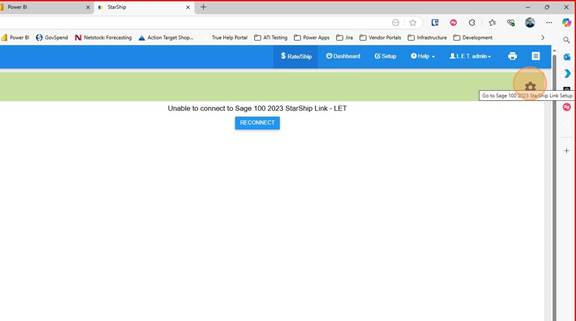
<span style="mso-fareast-font-family: Cambria; mso-fareast-theme-font: minor-latin; mso-bidi-font-family: Cambria; mso-bidi-theme-font: minor-latin;"><span style="mso-list: Ignore;">11.<span style="font: 7.0pt 'Times New Roman';"> </span></span></span>Click on the Gear icon

<span style="mso-no-proof: yes;">![](https://wiki.actiontarget.com/uploads/images/gallery/2025-09/embedded-image-ypm7vwdi.jpeg)</span>

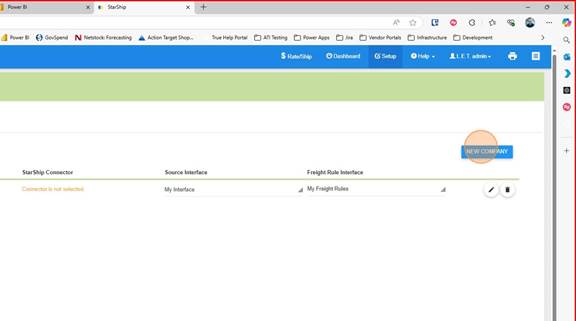
<span style="mso-fareast-font-family: Cambria; mso-fareast-theme-font: minor-latin; mso-bidi-font-family: Cambria; mso-bidi-theme-font: minor-latin;"><span style="mso-list: Ignore;">12.<span style="font: 7.0pt 'Times New Roman';"> </span></span></span>Click "New Company"

<span style="mso-no-proof: yes;">![](https://wiki.actiontarget.com/uploads/images/gallery/2025-09/embedded-image-bujtk5sm.jpeg)</span>

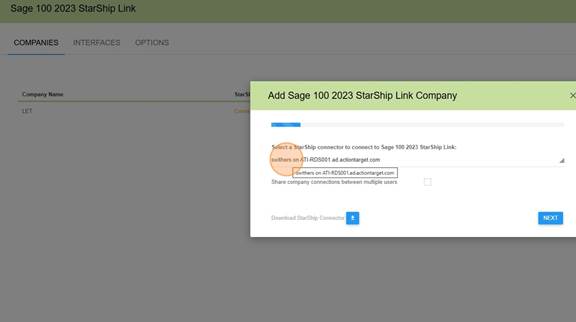
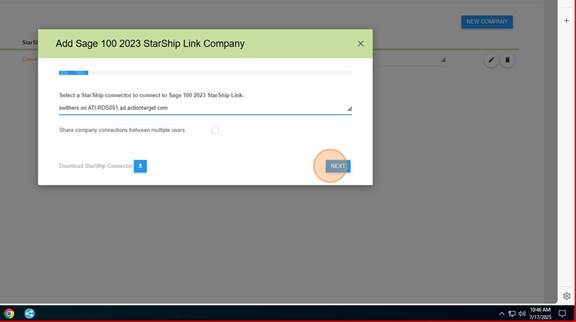
<span style="mso-fareast-font-family: Cambria; mso-fareast-theme-font: minor-latin; mso-bidi-font-family: Cambria; mso-bidi-theme-font: minor-latin;"><span style="mso-list: Ignore;">13.<span style="font: 7.0pt 'Times New Roman';"> </span></span></span>Choose the connector you just created.

<span style="mso-no-proof: yes;">![](https://wiki.actiontarget.com/uploads/images/gallery/2025-09/embedded-image-diiu7ray.jpeg)</span>

<span style="mso-fareast-font-family: Cambria; mso-fareast-theme-font: minor-latin; mso-bidi-font-family: Cambria; mso-bidi-theme-font: minor-latin;"><span style="mso-list: Ignore;">14.<span style="font: 7.0pt 'Times New Roman';"> </span></span></span>Click "Next"

<span style="mso-no-proof: yes;">![](https://wiki.actiontarget.com/uploads/images/gallery/2025-09/embedded-image-ud1ayj6z.jpeg)</span>

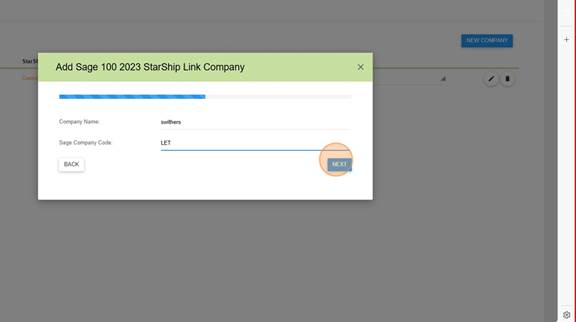
<span style="mso-fareast-font-family: Cambria; mso-fareast-theme-font: minor-latin; mso-bidi-font-family: Cambria; mso-bidi-theme-font: minor-latin;"><span style="mso-list: Ignore;">15.<span style="font: 7.0pt 'Times New Roman';"> </span></span></span>For Company Name - Your Username (the example below is swithers)  
For Sage Company Code - LET  
Click on "Next"
<span style="mso-no-proof: yes;">![](https://wiki.actiontarget.com/uploads/images/gallery/2025-09/embedded-image-r4ayvzwr.jpeg)</span>

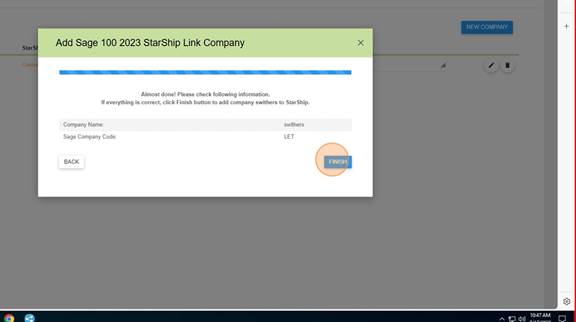
<span style="mso-fareast-font-family: Cambria; mso-fareast-theme-font: minor-latin; mso-bidi-font-family: Cambria; mso-bidi-theme-font: minor-latin;"><span style="mso-list: Ignore;">16.<span style="font: 7.0pt 'Times New Roman';"> </span></span></span>Click "Finish"

<span style="mso-no-proof: yes;">![](https://wiki.actiontarget.com/uploads/images/gallery/2025-09/embedded-image-vpv8aqie.jpeg)</span>