
Creating Quotes
Entering quotes is one of the most common tasks we do. Ensuring we accurately quote and get them to the customer as quickly as possible is critical to our business.
- Open Sales Order Entry
- Change the Order Type to Quote.
- Double check it is changed to quote. Failure to do so can lead to a sales order being entered, then shipped, then we will have to credit and pay for the return shipment to us. Critical this is double checked.
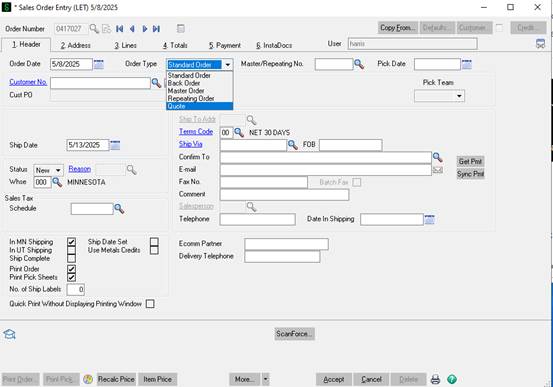
- The next step is to find the correct customer account. Hit the magnifying class to the right of Customer No.
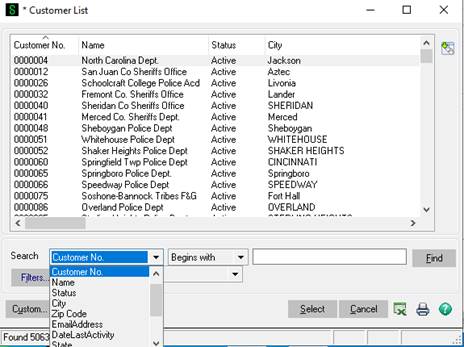
There are multiple ways to search for customers. Generally the best practice is to search by the zip code in the customers email signature then select the customer name that matches the customer name, agency, or business name. If there are multiple options look for the account with the most recent last activity date. If it's still not clear more research should be conducted. Note if a DNU is in the customer name do not use that account. If you do not have a zip code from the email then you can search by their email domain (@dpd.gov for example). If you do that make sure you change it to search by contains or ends with. If that does not work you can search by a portion of the customer's name again ensure you change from begins with to contains. For example if you are trying to find South Jordan Police department you could search contains South Jordan to find their account. The reason for this is the account name could be City of South Jordan, South Jordan PD, South Jordan, City of, etc.
-
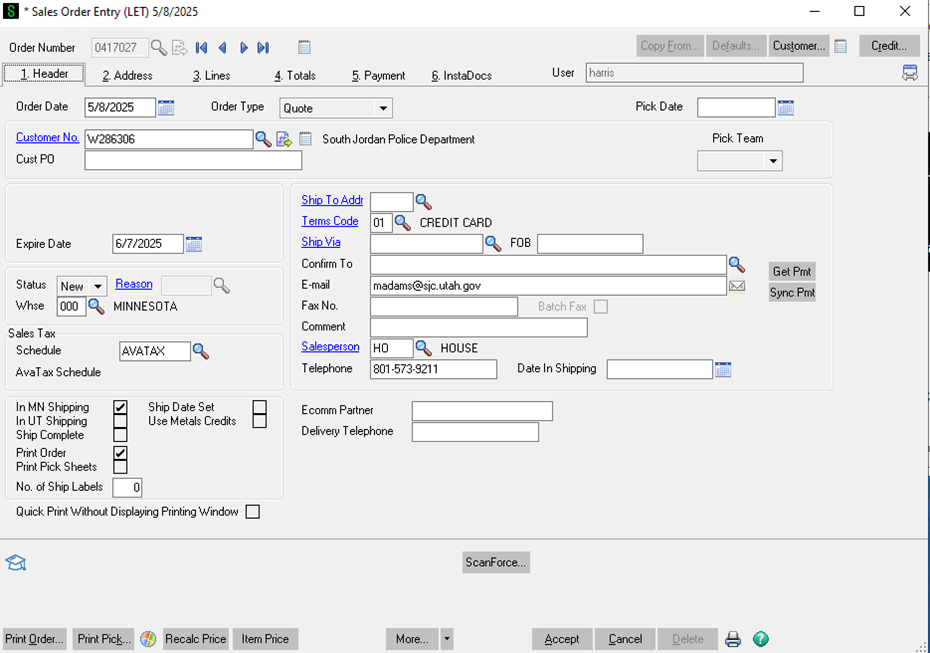
- Now that we've found and selected the customer number we can move on to entering the rest of the data on the Header Tab.
-
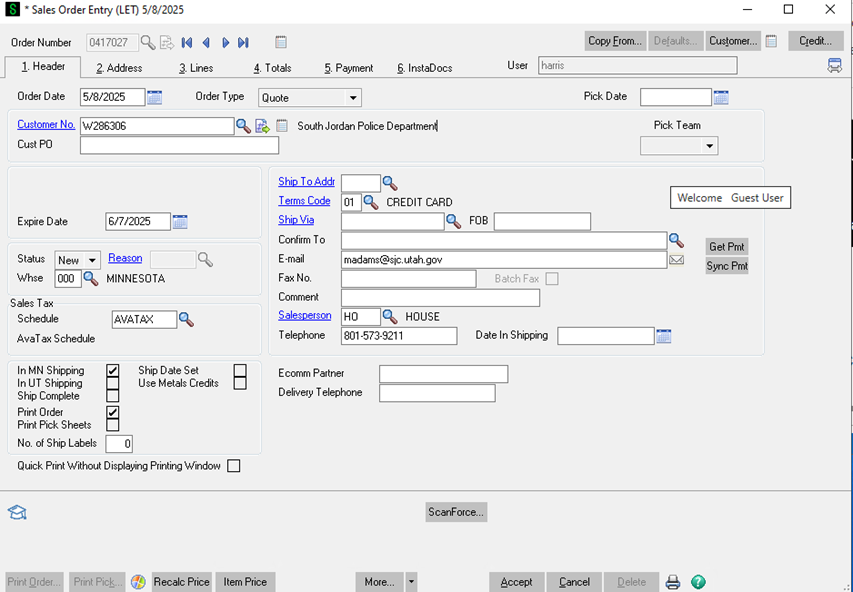
- The customer PO field is not required for quotes.
- In most cases it will be when entering sales orders which will be covered in another section.
- The expire date automatically goes 30 days out from when the quote is created.
- If the customer is requesting the quote should be valid for a longer period of time. Discuss with manager.
- Tax schedule should default to Avalara.
- The In MN shipping will be defaulted to checked. Once all of the items are entered on the Lines tab you will know if the order will be shipping out of MN 000, UT 001, Dropship 002 or a combination of the 3. If it's not shipping only out of MN the In UT shipping may need to be checked and the In MN shipping may need to be unchecked.
- The terms code should not be changed. If the customer has terms of credit card they can send an application for NET 30 terms but that is up to account to decide. Law enforcement agencies are the only customers we default to extending NET 30 terms to. Note that all international orders should of a terms code of wire. We will require the wire up front in full before the order is picked or shipped.
- The ship via should be FedEx Ground, USPS (ONLY IF GOING TO APO/FPO and sometimes PO boxes). FedEx overnight, FedEx 2 day, or LTL. This will be determined after we enter the lines items and determine how it will ship. So we will have to return to this main header tab.
- Ensure there is a phone number and email address.
- Next move to the Address Tab.
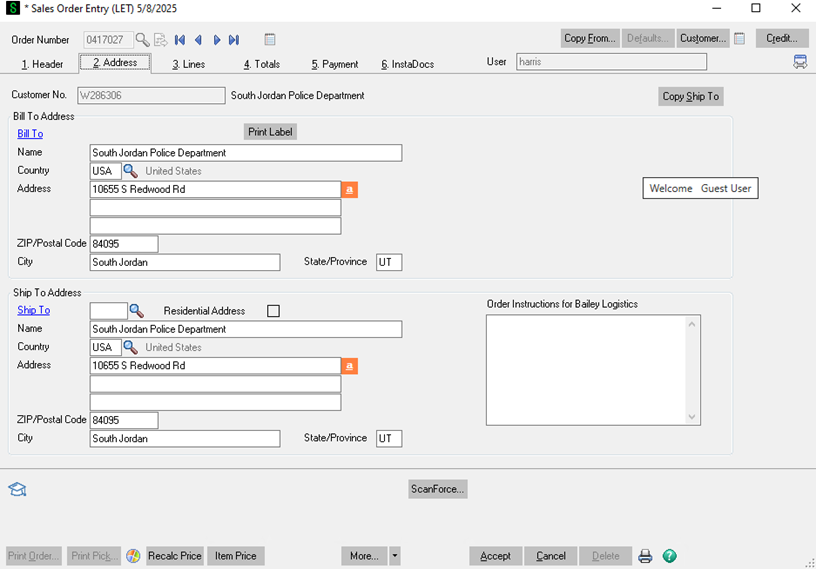
- The bill to address is pulling from the customer account. If this needs to change first ensure you have the correct customer account. If you do go to customer maintenance and change the bill to on the account. After that is compete you can change it on the quote.
- Ensure the ship to address is correct. In some cases some of our resellers will only give us a ship to zip code. That is perfectly fine at this point. When the quote changes into a sales order the Ship to address along with contact information and special instruction will need to be verified against the PO and with the customer.
- After you have the correct Ship to zip code (minimum requirement at this point) move to the Lines tab.
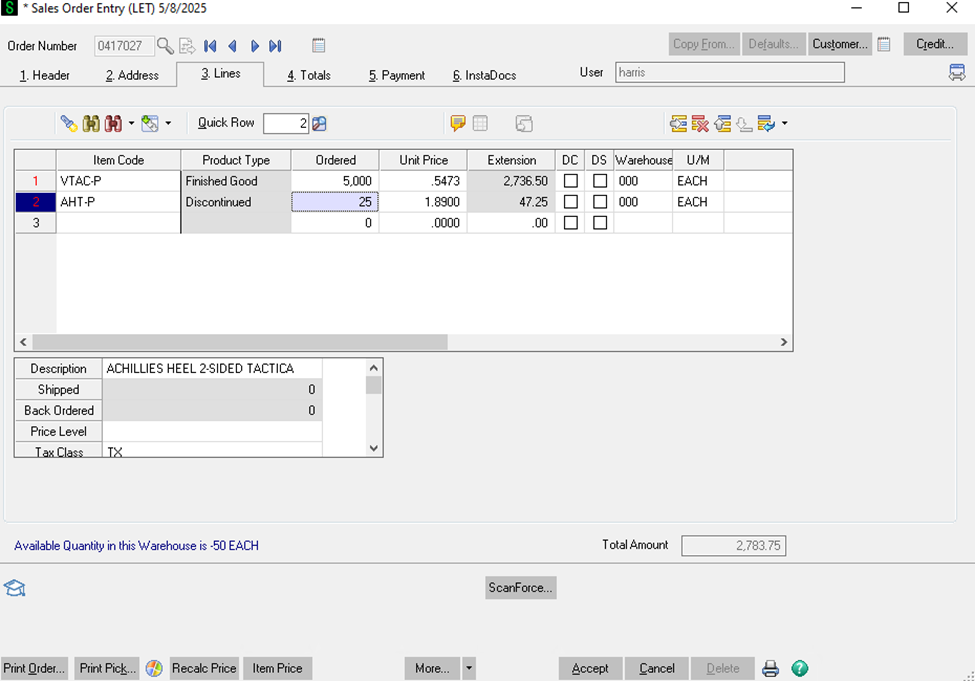
- On the lines tab this is where you are going to enter the products and qty the customer wants quoted.
- The section also provides some critical information you will need to be able to communicate the correct information to the customer.
- You can directly take enter the part number or search by clicking on the magnifying glass or hitting F2.
- Once the items code is entered you will need to enter the qty.
- The unit price will automatically pull up after the qty is entered.
- A few things to note.
- All of our paper targets are sold in increments of 25. So a customer could order 25, 50, 75….. 10,025 but not 2, 80, 113, etc.
- The product type will tell you if the product is aa Finished good, Discontinued, or a Kit. Finish Good and Kits are good to sell. Discontinued products require more research.
- If we have enough qty on hand we can sell that qty or less to the customer. If it's a low qty and a paper target, backer, or cardboard target contact the warehouse manager to ensure the inventory count is correct.
- Note for paper, cardboard, and or backers and it shows inventory in warehouse 003 that might as well be 0. Ignore that inventory.
- If it is discontinued with no inventory on hand but it is a paper or cardboard target we can make those to order.
- If we do that min orderable qty's will apply for paper that ranges from 2,500 to 5,000. Cardboard will always be 5,000 plus.
- Before quoting pricing to the customer 2 things need to happened.
- Let the customer know X item is discontinued but we could print it to order as long as we can hit the min or 2,500 to 5,000 (ask manager on what qty would apply to X SKU).
- If they are interested let Manager know so they can get our current cost and update the pricing before you quote the customer a price.
- Note any target that is made to order will have a 3 to 4 week lead time.
- If you right click on the Item code you can go into Item Inquiry to look at more detail.
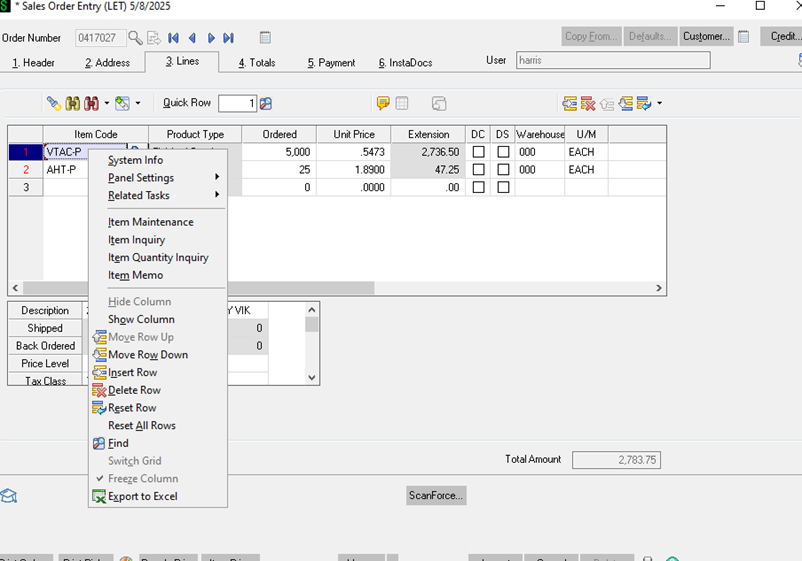
- The DS box needs to be checked if the item is coming out of warehouse 002 (drop ship warehouse).
- The DC box is the discount box. If you run into a situation where you need to apply a X% discount this box will have to be checked for all items for the discount to calculate properly across the order.
- Next you will move on to the totals tab.
- When you do a question box will pop up asking if you want to recalculate pricing. Select No.
-
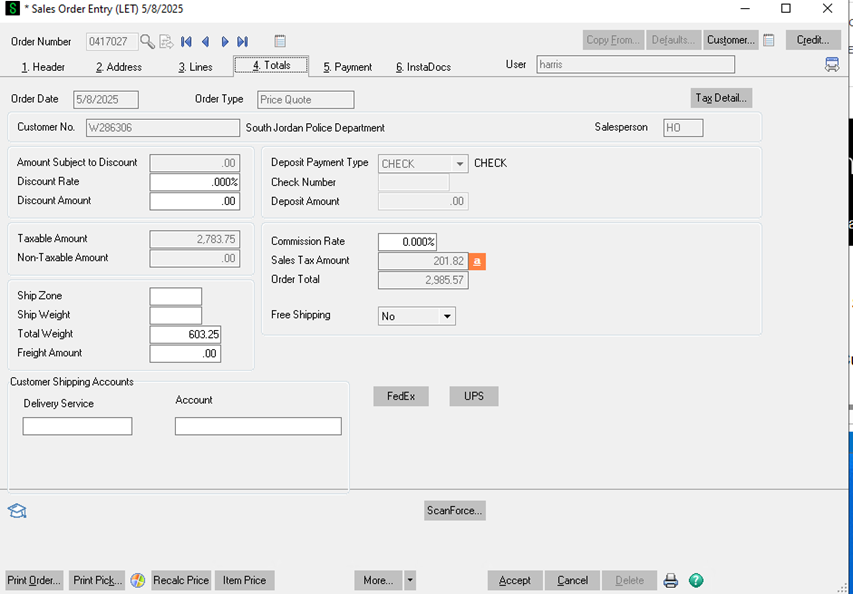
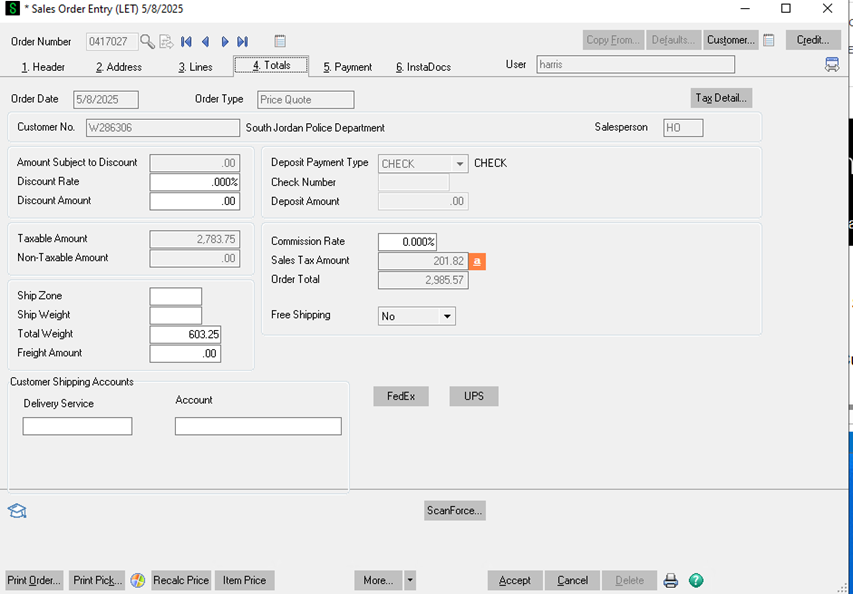
- Here you will see a few data fields.
- If you were applying a percent discount mentioned before you'd enter it in the Discount rate.
- Mainly we are looking at the weight to help determine how the order will ship.
- Shipping need to be calculated and entered in the Freight Amount box.
- Another section is dedicated on how to calculate shipping and determine the shipping method.
- The Sales Tax Amount will automatically calculate. If the customer is tax exempt and tax is showing up we will cover how to enter tax exemptions in another section.
- If everything looks good on this page we will return back to the header and enter the shipping methods (FedEx Ground, LTL, etc.) and we will check or uncheck the IN UT SHIPPING AND IN MN SHIPPING. Depending on what warehouse we are shipping out of.
- Once we have reviewed everything on the quote and we are confident everything is correct click on the Print Order button in the bottom left of the screen.
-
- It will ask if you want to save changes. Select Yes.
- To send to the customer we are going to print to a PDF.
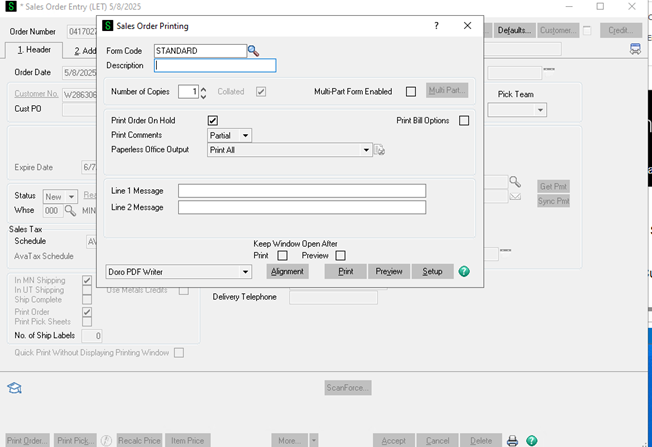
- Save the PDF with the date and customer name (5.8SouthJordanPD for example).
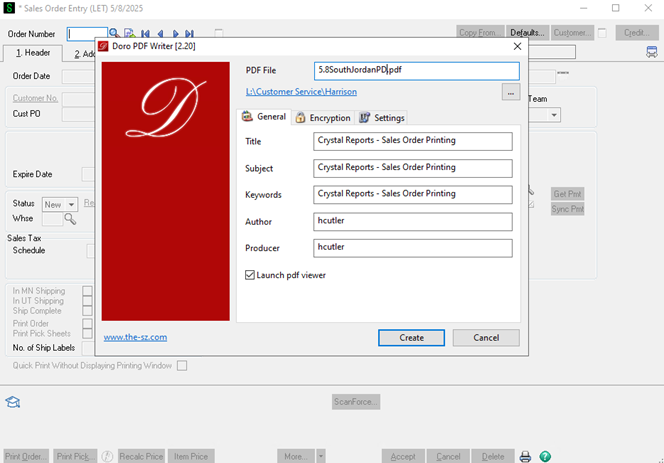
- At this point you will send the saved quote (PDF) to the customer.
- The email back to the customer should be something like: Hi Name, Attached is the quote you requested. Estimated lead time: 4 - 5 business days. Please let me know if you need anything else! Regards, Your email signature.
- We will go over how to determine the lead times of orders in another section.
- It's important you include all of the relevant information that your customer will need and address everything in their original request.
- It's always better to over communicate than under communicate.
-
- Most of our business is repeat customers so it is very important that we take care of these customers. Get them their quote as quickly as possible, ensure it is accurate, and ensure all of the information they need is included.
- Make sure we never push work onto customers that we can do for them. Ordering from us should be as frictionless as possible. For example if they don't know their account number do not push that back on them to figure out. Use whatever information you have to identify their account.
- If you run into issues ask a coworker or your manager for help.
- Pricing considerations
-
-
-
If a quote is particularly large work with manager on pricing if you think it's necessary to win the order.
-
In some cases law enforcement and military customers have budgets they need to stay under. If they do work with manager to see if we can do anything to win the order.
-
We want as many of these quotes to turn into orders as possible.
-
Paper targets have discounts biult in for all of our customers including military and law enforcement. The qty discounts are there for these customers.
-
Dealer pricing helps a lot as well.
-
-