
Tax Exemption
LoginIf intoa AvalaraTaxcustomer compliancewants softwareto andbe automatedset solutionsup -as Avalara

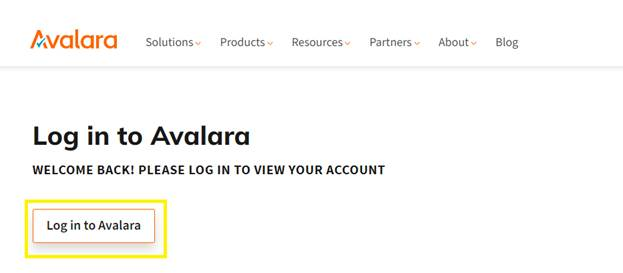
- a
Oncefewyouspecifichavestepslogged in you willyou'll need tonavigatetake tothemakeexemptionssuretabthey

- first
Fromstep is getting a copy of their exemption certificate. They may send thisexemptionwhenwindowthey request the exemption, or youcanmay have to request it from them. Every department and company has one of these, and if they try to say they don't clarify that you require a document that has eitherreviewtheirpreviousFEINaddedorcustomersTIDandnumber on it. You cannot exempt theirexemptionsaccountorwithoutaddone.aOnce
newyou'vecustomergotandthat, find theirexemption.exemption To add a new customer, clicknumber on thebluedocument.“AddItacancustomer”takebox.multiple
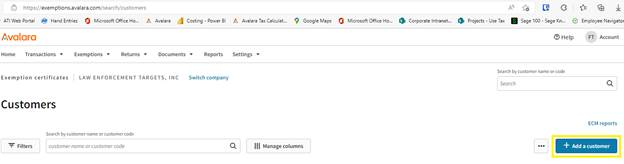
When adding a customer copy and pastebut theinformationmostfromcommonSageonedirectlyisintoXX-XXXXXXX.
Avalara’On the customer's
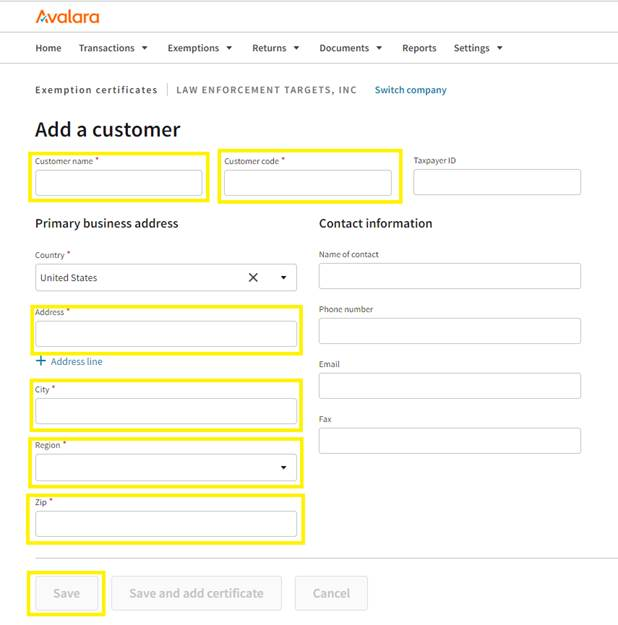
website.account, YouopenwilltheneedExemptions window. Put the customer's exemption number on the top line, then click the green check mark button tohavefillthe Customers nameCustomer Code this will be the customer numberit insage. For this to work properly you need to add two zeros to the front of the 7-digit customer number in sage. The CODE in Avalara needs to be at least (9) nine digits long.You will also need the address. All data can be copied and pasted except for region/state.Onceall therequiredotherfieldslines as well.
At this point, you'll have
been entered you will be abletoclick save to addcreate thecustomercustomer'sto Avalara.
- number
The Customer should have auto populatedaccount inthisAvalara.fieldIfsince we clicked on save and add exemption, please verify you areyou're adding an exemption to an existing account always try searching thecorrectcustomer'scustomer.in - Avalara
Youfirst to see if they've been set up in the past. If not, click "Add a customer" in the upper right corner.
On this page, fill in all the boxes that have an asterisk next to them with the details you already put into Sage. For the Taxpayer ID, you can list the exemption number. **During this step, it's very important to list the customer code correctly. The customer code is their account number in Sage with two zeros at the beginning. Without these zeros, their exemption will
neednot sync.**Once you've filled that in, click "Save and add certificate". This will take you to
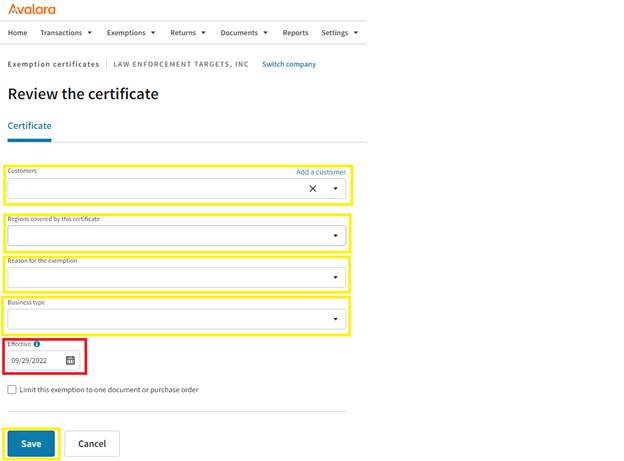
verifyawhichnew page where you'll list the state that the exemptionyouishaveactivebeforein,selectingthea regionreason for theexemption. Openexemption, andlook at the exemption while entering the data. - automatically
Once you have entered the Region the field where you can savethe exemption numberwillagain.
Onceappearthistowardsisthesetbottomup,ofittheshouldscreen.sync - with
The reason for the customer being exempt could be listed on the exemption.Sage. Iftheitreason is not stated, please reach out to someone in accounting to help determine what is the best selection. You may also use educational, state government or federal governmentBusiness type is also a required field. It often, but not always will match your exemption reason.The effective date should be todays date ifdoesn't, youare placing an order for a customer and have the exemption while placing the order. If they send it afterwards then you willmay need toselectwait adatefewthat is onminutes orbeforedoublethe date of the order socheck that theorderdetailswillarebecorrecttaxinfree.Click the save button to complete your entry